Product image supplied by the brand
In this guide
Logitech's Australian store lists two versions of the MX Master 3S. The Bluetooth Edition, part 910-007502 in Graphite, is A$149.95; its box holds the mouse and user documentation. The Standard Edition, 910-006561 in Graphite or 910-006562 in Pale Gray, is A$169.95 and adds a Logi Bolt USB receiver and a USB-A to USB-C charging cable. On Amazon Australia the Graphite mouse was A$144.33 on 5 November 2026, shipped and sold by Amazon Germany as an import.
What stays the same is the hardware people buy this mouse for: a Darkfield sensor that runs from 200 to 8,000 DPI, a MagSpeed electromagnetic scroll wheel, a thumb wheel, and switches Logitech says are 90 percent quieter than the MX Master 3's. The useful questions are which desks miss the receiver, how it compares with the A$99.95 M720 Triathlon, and where to buy it now that the MX Master 4 sits above it at A$199.95.
Our verdict
Buy the A$149.95 Bluetooth Edition if every computer on the desk has Bluetooth and a USB-C cable is already in the drawer; for a desktop without Bluetooth, the A$169.95 Standard Edition with its Bolt receiver is the cheaper route.
- A good fit for
- Laptop users who switch between two or three machines, want a thumb wheel and an electromagnetic scroll wheel, and care about click noise in a shared room.
- We would skip it if
- Your computer has no Bluetooth and you own no Logi Bolt receiver, you need a left-handed or compact mouse, or the A$99.95 M720 already covers three-device switching for you.
Reasons to consider it
- Darkfield sensor adjustable from 200 to 8,000 DPI that tracks on glass 4 mm or thicker
- MagSpeed electromagnetic wheel rated by Logitech at 1,000 lines per second
- Logitech claims 90 percent less click sound power than the MX Master 3, and up to 70 days per charge from the 500 mAh battery
The compromises
- The Bluetooth Edition box holds the mouse and documentation only: no Logi Bolt receiver, no charging cable
- Not compatible with Unifying receivers, and Logi Options+ runs only on Windows and macOS
- 141 g and 124.9 mm long, a large right-handed shape with no left-handed version
What we have not verified: Logitech Australia's page data marked all three variants out of stock on 5 November 2026 while its structured data said in stock, so whether the store ships today is unclear; Officeworks and JB Hi-Fi listed no MX Master 3S that day. No tracking, battery, noise or comfort was measured, and Logitech gives the quiet-click claim as a percentage, not in decibels.
The things in this guide
A closer look at the products, who they may suit, and what to check before buying.
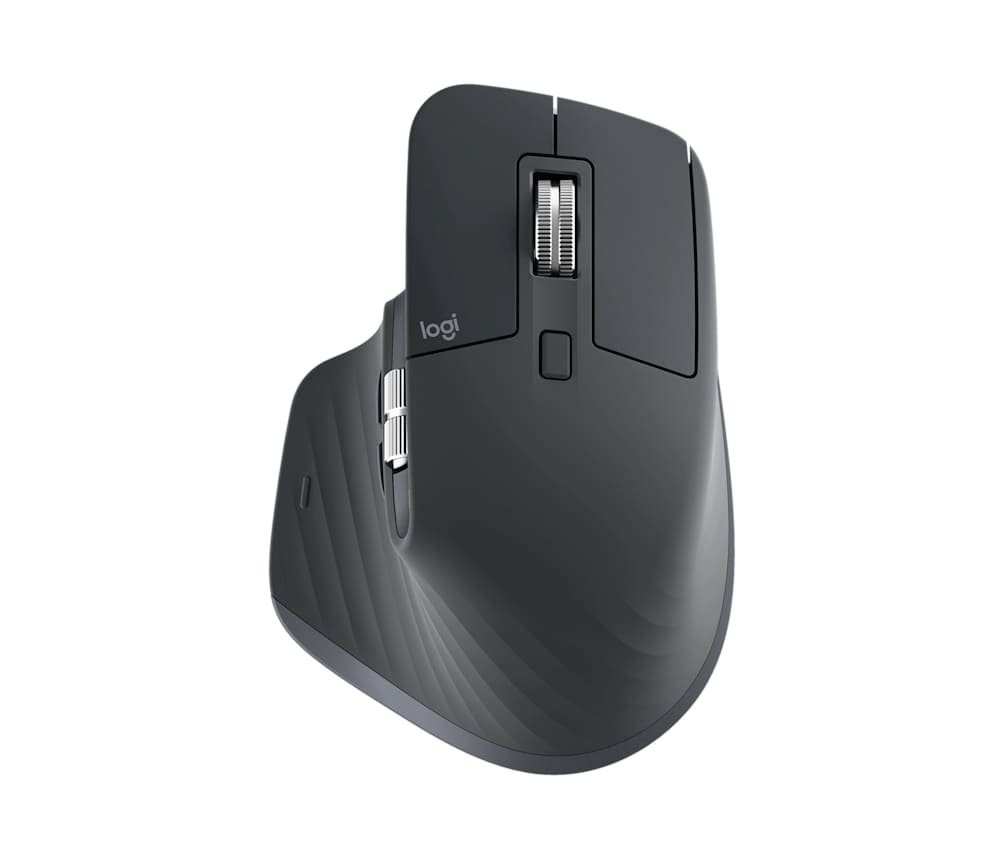
MX Master 3S Bluetooth Edition Wireless Mouse
A$149.95 buys the full MX Master 3S feature set: the 8,000 DPI Darkfield sensor that tracks on glass, the electromagnetic wheel, the thumb wheel and the quiet switches.
Before you buy: No receiver and no cable in the Bluetooth Edition box, Unifying receivers do not work with it, and full customisation needs Logi Options+ on Windows or macOS.
The box holds the mouse and a leaflet, and A$20 buys back the rest
Logitech Australia's In the Box list for the Bluetooth Edition reads Mouse and User documentation. The support guide fills in the rest: charge it with a USB-C to USB-C or USB-A to USB-C cable, not included, and if a Logi Bolt receiver is already in the drawer the mouse will pair with it. Otherwise Bluetooth Low Energy is the only way in, and the compatibility list adds that Unifying receivers will not work.
Logitech Australia still sells both versions. The Standard Edition at A$169.95 carries a Logi Bolt USB receiver and a USB-A to USB-C cable; the Bluetooth Edition at A$149.95 carries neither. For a laptop with Bluetooth and a phone cable on the desk, the A$20 saving is real. For a desktop tower with no Bluetooth radio, buying the Bluetooth Edition and then a receiver costs more than the Standard Edition.
8,000 DPI on glass and a wheel that shifts modes on its own
The Darkfield sensor ships at 1,000 DPI and can be set from 200 to 8,000, but changing it needs Logi Options+, which Logitech offers only on Windows and macOS. Logitech says it tracks on glass at least 4 mm thick. On a 4K monitor or a pair of screens the extra range matters; on a single 1080p display most people keep the default.
The MagSpeed wheel is electromagnetic, and Logitech calls it precise enough to stop on a pixel and quick enough to scroll 1,000 lines per second. It runs in a ratchet mode for lists and shifts to free spin as you scroll faster, with a button behind the wheel to force either state. A second wheel under the thumb scrolls sideways, and the app can remap it per program to zoom, brush size or tab switching.
Ninety percent quieter by Logitech's measure, and 70 days a charge
Logitech's quiet-click claim is specific but not in decibels: against the MX Master 3, the 3S has 90 percent less sound power on the left and right buttons, measured at one metre. No absolute figure appears, so anyone who needs a number for an open-plan office will not get one. The claim covers the two main buttons, not the thumb or gesture buttons.
The 500 mAh battery is rated for up to 70 days on a full charge, three hours from a one-minute top-up and, per the support guide, a full day from three minutes. Charging is through the USB-C port on the front, so the mouse keeps working on the cable while it charges, and three LEDs on the side show the level.
Three computers, Flow, and what the A$99.95 M720 already does
The Easy-Switch button underneath cycles between three paired computers: a short press changes channel, a three-second hold pairs a new one. With Logi Options+ installed on both machines, Flow moves the cursor across the screen edge from one computer to the next and carries copied text and files with it. Logitech gives the wireless range as 10 m, depending on the environment.
The M720 Triathlon at A$99.95 also pairs with three computers and is A$50 less. What it lacks is the electromagnetic wheel, the thumb wheel, the 8,000 DPI glass-capable sensor, the rechargeable battery and the quiet switches. If none of those five changes your day, the cheaper mouse is the better buy; if two or more do, the A$50 is what they cost.
Logitech direct, an Amazon import, and the MX Master 4 on the shelves
Amazon Australia's Graphite listing was A$144.33 on 5 November 2026, A$5.62 under Logitech's price, but the seller and shipper was Amazon Germany and the listing warns that imports from Germany may differ from local products. That makes Logitech's Australian store the cleaner purchase: it sells the local product and lists a one-year limited hardware warranty with it.
The big retail chains have moved on. Officeworks' search for the 3S returned only MX Master 4 models at A$197, and JB Hi-Fi returned nothing. Logitech itself sells the MX Master 4 at A$199.95, A$50 above the 3S Bluetooth Edition. If the 3S is hard to find in stock, that price gap is the comparison to make.
A large right-handed shape, software on two platforms, and who should skip it
The mouse measures 124.9 mm long, 84.3 mm wide and 51 mm tall and weighs 141 g, and the sculpted thumb rest makes it right-handed only. Logitech lists no left-handed version, so small hands or a fingertip grip should try one first. On ChromeOS, Linux, iPadOS and Android it works with basic functions only, since Logi Options+ exists for Windows and macOS alone.
Skip the Bluetooth Edition if your computer has no Bluetooth and you own no Bolt receiver; the Standard Edition at A$169.95 solves that for A$20. Skip it, too, if button remapping matters and your main machine runs Linux or ChromeOS, or if three-device switching is all you need. Buy it for a Bluetooth laptop desk where the wheel, the thumb wheel and the quieter clicks are the reason to spend A$149.95.
How we put this together
Built from the product pages and listings below, without test scores or results we have not measured. Specifications and prices change, so check the original page for the exact model, current price, delivery, and returns.
- Logitech Australia: MX Master 3S (opens in a new tab)
- Logitech support: Getting Started - MX Master 3S Bluetooth Edition (opens in a new tab)
- Logitech Australia: M720 Triathlon and MX Master 4 (opens in a new tab)
- Amazon Australia: Logitech MX Master 3S, Graphite (opens in a new tab)
- Officeworks and JB Hi-Fi: searches for MX Master 3S (opens in a new tab)