Product image supplied by the brand
In this guide
The K380s earns a desk when it removes duplication: one keyboard for a laptop, a tablet and a phone on a small surface. It earns much less as a way to clear space. A missing key you reach for twenty times a day costs more attention than the bare desk is worth.
Logitech's Canadian store lists the Pebble Keys 2 K380s at C$59.99 in Tonal Graphite, Tonal Rose and Tonal White, and on 2026-11-05 all three showed C$44.99 against that price with no end date. Every variant on that store is "English US (QWERTY)". There is no Canadian French or Canadian Multilingual option, so a typist who writes in French every day should settle the layout question before the price.
Our verdict
Consider it at C$59.99 for a compact keyboard shared between up to three devices; keep a fuller keyboard if a number pad, a Canadian French layout or your current shortcuts matter more than desk space.
- A good fit for
- Someone typing in English on two or three Bluetooth devices from a small desk or a bag, who wants replaceable batteries rather than a charging cable.
- We would skip it if
- You type French daily and want accents printed on the keys, or a number pad or familiar navigation cluster is central to your work.
Reasons to consider it
- Three paired channels and an Easy-Switch key per channel replace moving one keyboard between connections
- Two replaceable AAA cells, no charging cable to carry
- Logitech lists 279.5 × 124.2 × 16.4 mm and 415 g with batteries, a small object to place or pack
The compromises
- Logitech Canada sells only the US English QWERTY layout, with no Canadian French variant
- No number pad, and the compact layout moves navigation keys some typists rely on
- Logi Bolt receiver sold separately; remapping depends on Logi Options+ and the operating system
- Logitech Canada lists a one-year limited hardware warranty
What we have not verified: No typing trial: speed, error rate, noise, connection reliability and battery endurance are unmeasured. Logitech's own pages disagree on battery life (up to 36 months on the shop page, more than 50 months on the specification page), so neither figure is relied on here.
The things in this guide
A closer look at the products, who they may suit, and what to check before buying.
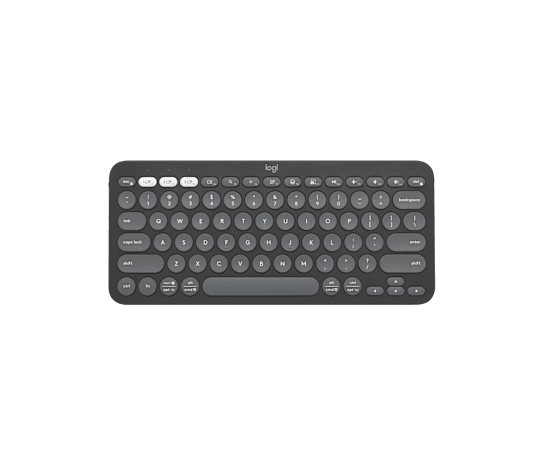
Pebble Keys 2 K380s
C$59.99 at Logitech Canada (C$44.99 with no end date on 2026-11-05) for three Bluetooth channels, two replaceable AAA cells and a 279.5 mm body.
Before you buy: Logitech Canada sells only the US English layout, with no number pad; French accents need an OS input setting rather than printed keys.
Price checked November 5, 2026. Retailer prices can change.Check the layout Canada actually sells
Logitech's Canadian store offers this keyboard in one layout only: English US (QWERTY), in all three colours. For an English typist that is the familiar arrangement. For someone who writes French at work, it means no printed é, è, ç or à keys; accents come from an operating-system input setting or dead keys, which is workable but is a habit to test before relying on the keyboard every day.
Logitech lists the body at 279.5 by 124.2 by 16.4 mm and 415 g with batteries. That describes what you place or pack, not how comfortable it is to type on. Take a real task to the trial, a column of figures or a document to edit with your own shortcuts, and notice whether attention stays on the work or drifts to the keys. That trial was not run here.
Give each channel one device
The keyboard pairs with up to three devices over Bluetooth Low Energy, each held on its own Easy-Switch key; holding a key for three seconds puts that channel into pairing mode. Logitech's guide also describes an optional Logi Bolt receiver, which is bought separately rather than included in the box.
Assign the channels once, say work laptop on one, tablet on two, phone on three, and leave them. A channel reassigned on the fly turns every switch into a guess, and three paired devices are three separate screens: check which one has focus before typing a password.
Judge the plain keyboard before the software
Logi Options+ can remap ten keys, and some modifier keys change meaning with the connected operating system. Count that configuration as a bonus once your operating system, and any workplace software policy, allow it. A shortcut in Logitech's marketing says nothing about the application you use.
Anyone moving between Windows, macOS and iPadOS should test the modifier keys and the navigation commands they use daily. That is where a compact layout goes wrong quietly, as a dozen small corrections a day that feel like your own clumsiness rather than a keyboard problem.
Two AAA cells, a one-year warranty and the list price
The keyboard runs on two AAA cells, and Logitech's getting-started guide shows how to replace them. Its own pages disagree on how long they last: the Canadian shop page says up to 36 months depending on use, while the specification table says more than 50 months and, in the same table, that the battery is not user-replaceable. Keep a spare pair and ignore both month counts.
Logitech Canada lists a one-year limited hardware warranty. At the C$59.99 list price the K380s makes sense when it removes a real inconvenience and survives the layout trial; the undated C$44.99 markdown on 2026-11-05 lowers the cost of trying, not the layout question. Keep the keyboard you have if it already fits the desk, the language you type and the work.
How we put this together
Built from the product pages and listings below, without test scores or results we have not measured. Specifications and prices change, so check the original page for the exact model, current price, delivery, and returns.
- Logitech Canada: Pebble Keys 2 K380s product page (opens in a new tab)
- Logitech Support (Canada): Getting started with Pebble Keys 2 K380s (opens in a new tab)
- Logitech Support (Canada): Pebble Keys 2 K380s specifications (opens in a new tab)