Product image supplied by the brand
In this guide
This mouse is justified by a list of repetitive annoyances, written down before ordering. Long reports every day, back and forward a hundred times an hour, a personal machine and a work machine on the same desk. With none of those on the list, the extra controls change nothing about the work.
The US listing showed $44.99 when checked; the question is whether those controls become habits. A cheaper mouse whose buttons you actually use beats a loaded one whose side controls you press by accident twice a year. The M720 belongs on a shortlist; its longevity and its button count are not a substitute for putting a hand on it.
Our verdict
Shortlist it for frequent document navigation and repeated commands, provided the right-handed shape fits you.
- A good fit for
- A desk worker who can identify useful jobs for thumb controls and alternate scrolling modes.
- We would skip it if
- You use your left hand, prefer a very low mouse, or mainly need something small for occasional travel.
Reasons to consider it
- Several physical controls can serve repeated commands
- An included receiver gives another connection route
The compromises
- More controls add little when left unused
- A right-handed contour cannot establish personal comfort
What we have not verified: Untested here: grip comfort, wheel feel, tracking, battery life, reliability.
The things in this guide
A closer look at the products, who they may suit, and what to check before buying.
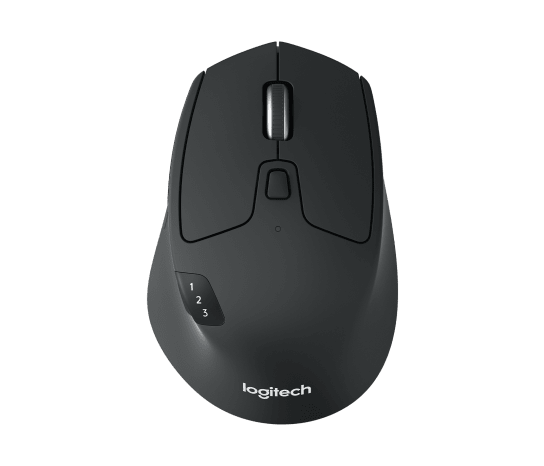
M720 Triathlon Mouse
Worth it when navigation and repeated commands are frequent enough to deserve dedicated buttons.
Before you buy: Try the exact right-handed shape before treating it as an all-day solution.
Price checked September 10, 2026. Retailer prices can change.Assign two jobs before buying
Logitech describes two side buttons, an additional thumb control, a dual-mode scroll wheel, and horizontal tilt scrolling. Customization is available through Logi Options+ on supported systems. Those are specific tools rather than a general promise that you will finish work faster.
Write down two commands you repeat often enough to remember without looking. Back navigation and a frequently used application command are reasonable candidates. If your imagined assignments mostly duplicate shortcuts you already execute automatically, the new controls may solve very little. On a managed computer, establish which software and customization are permitted before counting them as part of the purchase.
Try scrolling in the documents that matter
A free-running wheel and a more controlled scrolling mode serve different intentions: crossing a long document and stopping near a particular item. The useful question is whether switching between them feels natural while working. A specification sheet cannot tell us whether the wheel will stop where you expect or whether its resistance suits your fingers.
For a personal trial, open a long spreadsheet and a document you already know. Navigate to familiar places, select text, and return to an earlier section. This is a suggested evaluation, not a test we have performed. Judge the interruptions as well as the moments that feel quicker; overshooting repeatedly can erase the value of moving through a page rapidly.
Check the receiver family before combining peripherals
The M720 supports Bluetooth and Logitech Unifying connectivity, with a Unifying receiver included. It can remember three devices. The connection badge matters when combining it with a keyboard: a Logitech logo alone does not establish that two products can share the same receiver.
A desk that rarely changes computers needs one reliable connection and nothing more. Two machines raise a different question: how you switch, and whether the keyboard follows or stays behind. A three-device mouse is not a KVM. Get the basic arrangement working before adding the software-dependent cross-computer features, which carry their own compatibility list.
Let the grip veto the feature list
This is a right-handed design. That makes it a poor default recommendation for a shared desk whose users alternate hands. It also means the contour should be evaluated with your normal posture and pointer settings, not accepted because the manufacturer describes it as supportive.
Buy the M720 when the hand test and the button plan agree. If either fails, skip it. Keeping the mouse you have is a fine outcome, particularly when a keyboard shortcut or an application setting removes the annoyance for nothing. Nothing here supports a promise about fatigue or service life.
How we put this together
Built from the product pages and listings below, without test scores or results we have not measured. Specifications and prices change, so check the original page for the exact model, current price, delivery, and returns.
- Logitech: M720 Triathlon US listing (opens in a new tab)
- Logitech: M720 quick-start guide (opens in a new tab)