Product image supplied by the brand
In this guide
A trackball asks for a strange bargain: give up the arm movement your mouse habits are built on, and in exchange your hand stops traveling the desk across long working days. The MX Ergo S is Logitech's second version of that bargain. It keeps the original MX Ergo's thumb ball, tracking range and hinged tilt, and changes three things: quieter clicks, USB-C charging, and a Logi Bolt receiver in place of Unifying.
Whether the bargain pays depends on why you are shopping. A sore wrist or forearm is the case Logitech designed it for; a job that runs on fast, precise pointer movement is the case where $99.99, Amazon's price on October 25, 2026, buys a slower tool.
Our verdict
At $99.99 the MX Ergo S is the trackball to try when wrist or forearm strain makes a mouse unpleasant, provided your work tolerates a slower pointer.
- A good fit for
- Right-handed desk workers with wrist or forearm strain, tight desks, and two computers to switch between, who will put up with relearning pointer control.
- We would skip it if
- Left-handed users, anyone whose work lives on fast flicks or pinpoint selection, and comfortable mouse users whose only goal is a faster pointer.
Reasons to consider it
- A hinged base that tilts between 0 and 20 degrees and a body that stays put while the thumb steers, the whole premise of a thumb trackball.
- Logitech claims up to 120 days on a full charge, with a one-minute top-up rated for 24 hours of use, now over USB-C instead of the original's micro-USB.
- Bluetooth Low Energy or the included Logi Bolt receiver, with an Easy-Switch button that holds two computers.
The compromises
- Tracking stays in office territory: one spec row reads 512 to 2,048 DPI, another 100 to 2,000 in software, and speed is rated only as above 20 inches per second.
- The USB-C port charges quickly, but the box holds no cable, where the original MX Ergo shipped with its micro-USB lead.
- The MX Ergo S is manufactured in a right-handed configuration only, per Logitech's own product FAQ.
What we have not verified: Logitech rates the main buttons at 3 million presses and the middle wheel button at 1 million, but publishes nothing on the scroll-wheel mechanism's long-term behavior, and the 120-day battery claim comes from Logitech under unspecified conditions.
The things in this guide
A closer look at the products, who they may suit, and what to check before buying.
MX Ergo S
The most practical first trackball for mouse-fatigued right hands: a hinged tilt up to 20 degrees, two-computer switching, and a battery measured in months rather than weeks.
Before you buy: Its published DPI and speed ceilings sit well below a modern mouse, Easy-Switch stops at two computers, and left-handed buyers are not served at all.
Price checked October 25, 2026. Retailer prices can change.What the Ergo S is
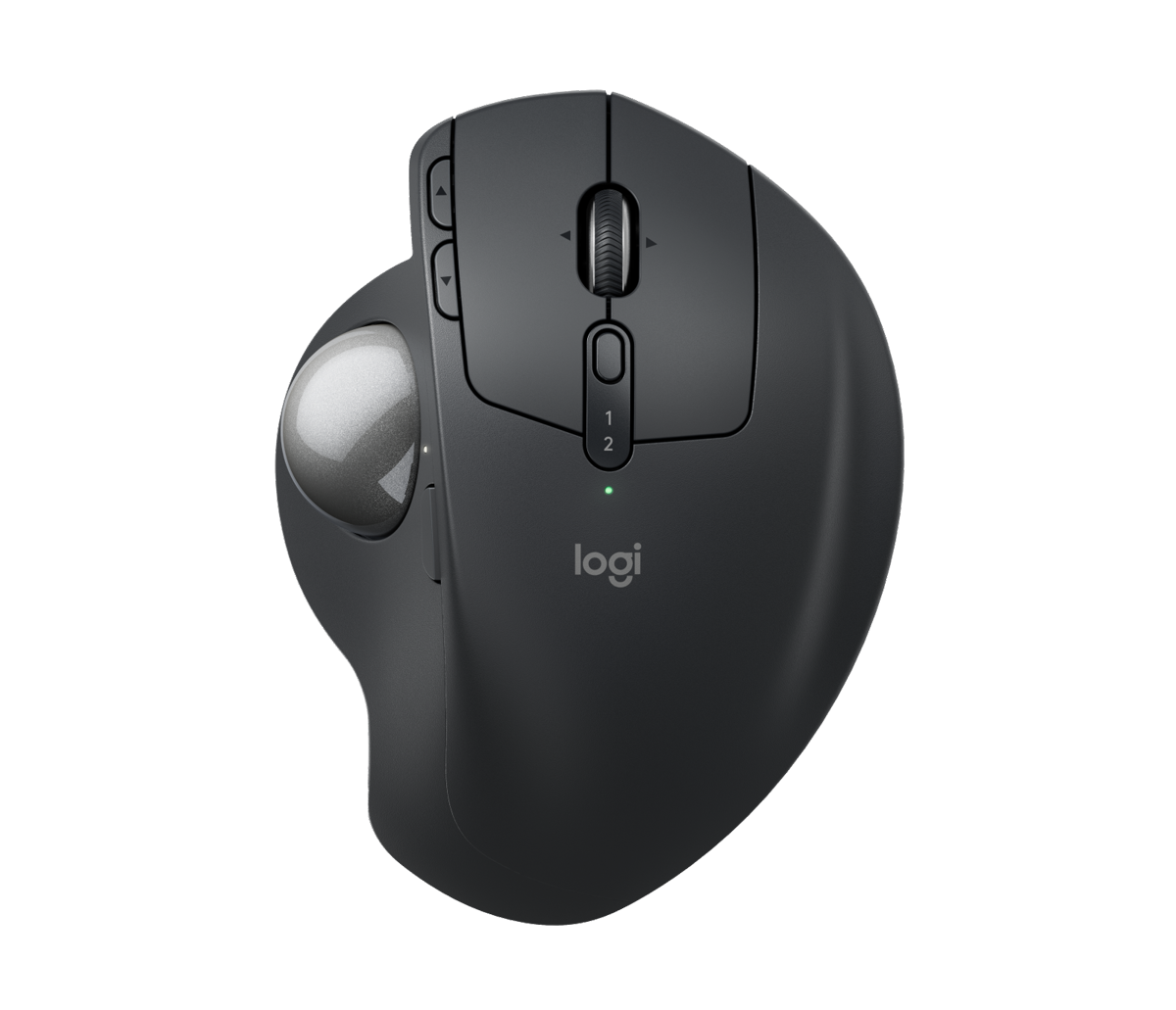
The MX Ergo S is a thumb-driven trackball: the case stays put, a ball under the left thumb does the pointing, and two fingers rest on the left- and right-click buttons. It comes in graphite, as a standard model and an MX Ergo S Plus that adds a detachable wedge. Amazon sells the standard model, shipped and sold by Amazon.com, at $99.99 against a $119.99 list price. Logitech's own US store marked the standard style not available on October 25 and would only sell the Plus.
Logitech's FAQ names what changed from the original MX Ergo: quieter clicks, which Logitech puts at 80 percent quieter on the left click, USB-C charging, and Logi Bolt. The original paired over Bluetooth or a Unifying receiver and charged over micro-USB, and Logitech's US store now lists both of its versions as not available. The tilting scroll wheel, the precision-mode button beside the ball, and the Easy-Switch key keep the original's layout.
The wrist case for a parked hand
Logitech's ergonomic argument rests on geometry. A hinged base sets the body anywhere between flat and 20 degrees, a pose Logitech describes as certified by ergonomists, and Logitech puts the gain at 27 percent less forearm muscle strain at 20 degrees, compared with Logitech's M650 mouse. Once the hand settles, the fingers and wrist stop dragging a mouse across the pad; the thumb rolls the ball and nothing else moves. For wrists already sore from lateral mouse travel, that reduction in repeated travel is the product.
The chassis that enables the pose is compact and dense: 132.5 by 99.8 by 51.4 mm, 259 g with the magnetic metal base plate fitted and 164 g without it. The plate also comes off for cleaning, when the ball is pushed out from a hole underneath. On a shallow desk the footprint is the win, and the weight that keeps it stable in the hand is the same weight that makes it a poor travel mouse substitute.
Precision has a ceiling
Logitech's specification sheet is inconsistent on sensitivity: one row reads 100-2000 DPI in software and 4,000 in firmware, another carries a 512-to-2048 range, the same range Logitech lists for the original MX Ergo, so the sensor envelope did not move with the S. The same sheet rates acceleration above 10 G and speed above 20 inches per second. Those are office numbers, not gaming or retouching numbers, and the precision-mode button near the ball lowers DPI further for fine work.
The practical meaning: spreadsheets, documents, code, and multi-monitor navigation sit comfortably inside what this sensor delivers. Fast flick shots in a game, or hairline selections across a large canvas, will feel throttled next to a modern mouse, and with the ceiling set in the spec sheet, no settings change closes that gap.
Battery and connectivity
Logitech rates the battery at up to 120 days per full charge, with one minute of charging rated for 24 hours of use and two hours from empty to full, through a USB-C port on the front. Inside the carton: the trackball, the Logi Bolt receiver and documentation, and Logitech's own wording is cable not included; any USB-C to USB-C or USB-A to USB-C lead will do.
Connection is Bluetooth Low Energy 5.2 or the included Logi Bolt receiver, which occupies one of the computer's USB-A slots, and Easy-Switch holds two computers. Windows 10 or later, macOS 12 or later, Linux, and ChromeOS work either way; iPadOS 15 and Android 12 and later work over Bluetooth only. Logi Options+, needed for button remapping, Smart Actions, and Flow between the two computers, runs only on Windows and macOS.
The Plus variant
The MX Ergo S Plus adds one item to the box: a detachable wedge that Logitech's specification sheet calls an extra 10 degrees. The sheet lists the same body dimensions and weight for both versions, so the choice is posture preference, not hardware, and the wedge is not new either, since the original MX Ergo also came in a Plus version.
Logitech lists both styles at the same $119.99, and on October 25 the Plus was the only one Logitech.com would sell, so a logitech.com order gets the wedge whether you want it or not. Logitech offers no guidance on who needs the extra tilt, which argues for starting at the standard 20 degrees. Hardware coverage is Logitech's one-year limited warranty either way, and an Amazon order goes back under Amazon's returns, which allow 30 days.
Who should not switch
Left-handed buyers are excluded outright: asked directly, Logitech's product FAQ answers that the MX Ergo S is currently manufactured in a right-handed configuration only, with no mirror version to buy.
The second group that should stay on a mouse is defined by the speed numbers above: anyone whose work or play lives on fast, large-canvas pointer movement. And the third is dispositional rather than physical, the people who resent relearning a skill. Steering with the thumb is new muscle memory for a mouse user, and an input device that stays foreign gets retired however sensible its tilt angle is for the wrist.
How we put this together
Built from the product pages and listings below, without test scores or results we have not measured. Specifications and prices change, so check the original page for the exact model, current price, delivery, and returns.
- Logitech: MX Ergo S product page (opens in a new tab)
- Logitech Support: Specification - MX Ergo S (opens in a new tab)
- Amazon: Logitech MX Ergo S Advanced Wireless Trackball Mouse, Graphite (opens in a new tab)
- Logitech: MX Ergo product page (original model) (opens in a new tab)