Product image supplied by the brand
In this guide
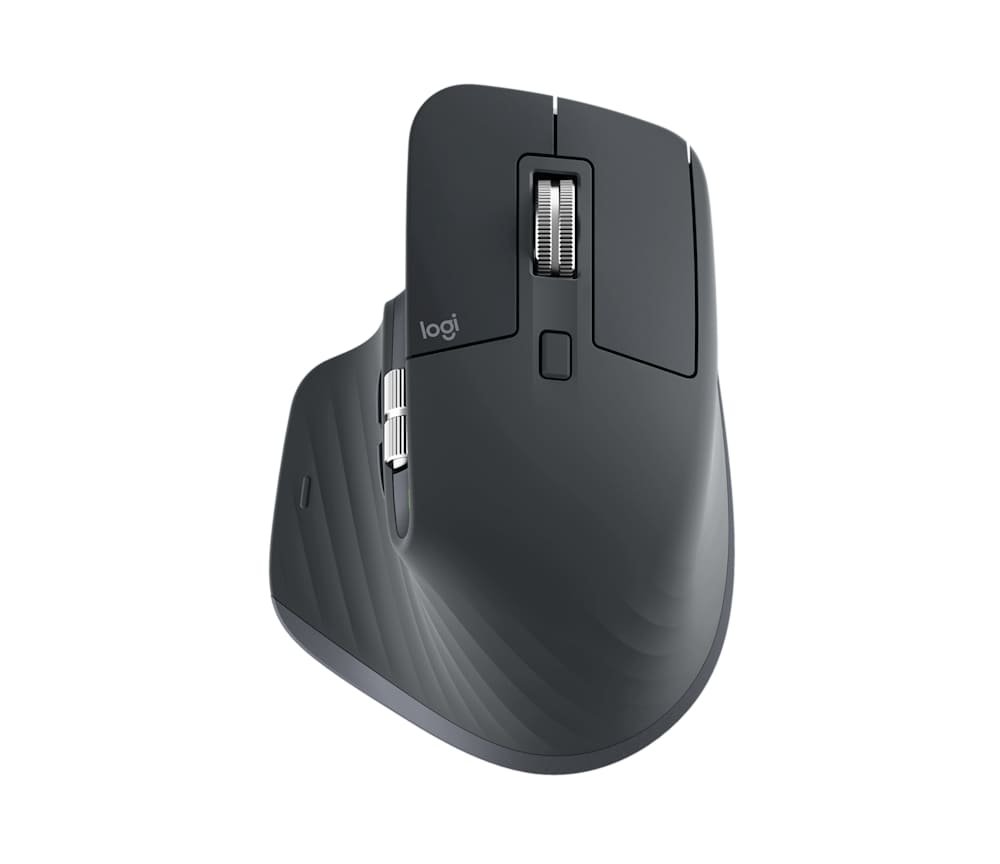
Logitech's US store carries one version of the MX Master 3S today: the Bluetooth Edition, part 910-007499 in graphite and 910-007500 in black, marked down to $89.99 from a $99.99 list price and in stock in both colors on September 11, 2026. The name matters. The carton holds the mouse and a leaflet; the Logi Bolt receiver that came with the original release is gone, and so is the charging cable. Logitech's own dimension table still lists the receiver, flagged as standard-edition only.
What stays is the hardware people buy this mouse for: a Darkfield sensor that runs from 200 to 8,000 DPI, a MagSpeed electromagnetic scroll wheel, a thumb wheel, a gesture button, and switches that Logitech says put out 90 percent less sound power than the MX Master 3. The sections below take the published numbers, compare them with the $44.99 M720 Triathlon that also switches between three computers, and work out which desks lose something by the missing receiver.
Our verdict
A strong pick for a desk with Bluetooth on every computer and a spare Type-C cable in a drawer; a weaker one for a desktop tower with no Bluetooth, where the missing Logi Bolt receiver turns a $89.99 mouse into a $89.99 mouse plus a receiver purchase.
- A good fit for
- Laptop users who move between two or three machines, want a thumb wheel and an electromagnetic scroll wheel, and care about click noise in a shared room.
- We would skip it if
- Your computer has no Bluetooth radio and no free USB-A port for a receiver, you want a cable in the box, or a $44.99 M720 already covers three-device switching for you.
Reasons to consider it
- Darkfield sensor adjustable from 200 to 8,000 DPI that tracks on glass 4 mm or thicker
- MagSpeed electromagnetic wheel rated by Logitech at 1,000 lines per second with automatic shift between ratchet and free spin
- Logitech claims 90 percent less click sound power than the MX Master 3, and up to 70 days per charge from the 500 mAh cell
The compromises
- Package contents are the mouse and documentation: no Logi Bolt receiver and no charging cable
- Not compatible with Unifying receivers, and Logi Options+ runs only on Windows and macOS
- 141 g and 124.9 mm long, a large right-handed shape with no left-handed version
What we have not verified: No tracking, battery, noise or comfort was measured. Logitech gives the quiet-click claim as a percentage, not in decibels, and the three-computer figure comes from the support guide, not the store listing. Both colors were in stock at $89.99 on September 11, 2026; the sale price has no stated end date.
The things in this guide
A closer look at the products, who they may suit, and what to check before buying.
MX Master 3S Bluetooth Edition Wireless Mouse
The 8,000 DPI Darkfield sensor, the electromagnetic wheel and the quiet switches are the full MX Master 3S feature set at $10 under list.
Before you buy: No receiver and no cable in the box, Unifying receivers do not work with it, and full customization needs Logi Options+ on Windows or macOS.
Price checked September 11, 2026. Retailer prices can change.The box holds the mouse and a leaflet, and that changes the price
Logitech's package-contents line reads "Mouse" and "User documentation." The support guide for this edition spells out the rest: charge it with a Type-C to Type-C or Type-A to Type-C cable, not included, and if a Logi Bolt receiver is already in the drawer the mouse will pair with it. If you do not, Bluetooth Low Energy is the only way in, and the compatibility list adds that Unifying receivers will not work at all.
For a laptop desk the omission is a small footnote, since most laptops made in the last few years have Bluetooth and a Type-C cable is already on the desk for a phone. For a desktop tower without a Bluetooth radio it is the whole purchase decision: the $89.99 sale price only holds if a Bolt receiver is on hand, and the receiver itself needs a free USB-A socket. Check the computer first, then judge how real the discount from $99.99 is for you.
8,000 DPI on glass and a wheel that shifts modes on its own
The Darkfield sensor ships at 1,000 DPI and can be set anywhere from 200 to 8,000 in 50 DPI steps, though changing it needs Logi Options+, which Logitech offers only on Windows and macOS. Logitech says it tracks on glass with a 4 mm minimum thickness. On a monitor at 4K or higher the extra range matters; on a single 1080p screen the default setting is the one most people will keep.
The MagSpeed wheel is electromagnetic: Logitech's copy calls it precise enough to stop on a pixel and quick enough to scroll 1,000 lines per second, and says it is nearly silent. The support guide describes the mechanism more plainly, a ratchet mode for lists that shifts to free spin as you scroll faster, with a mode-shift button on top to force either state and a sensitivity slider in the software. A second wheel under the thumb handles horizontal scrolling, and the app can remap it to zoom, brush size or tab switching per application.
Ninety percent quieter, as measured by Logitech, and seventy days between charges
Logitech's quiet-click claim is specific but not in decibels: compared with the MX Master 3, the 3S has 90 percent less sound power on the left and right buttons, measured at one meter. No absolute figure appears anywhere in the listing, so a buyer who needs a number for an open-plan office will not get one here. The claim covers the two main buttons; the thumb buttons and the gesture button are not part of it.
The battery is a 500 mAh rechargeable cell that Logitech rates at up to 70 days on a full charge, with three hours of use from a one-minute top-up and, per the support guide, a full day from three minutes. Both figures carry the usual usage caveat. Charging goes through the Type-C jack on the front, which means the mouse still works on the cable while it charges, and three LEDs on the side show the level: green above 10 percent, red below, pulsing green while plugged in.
Three computers, Flow, and what the $44.99 M720 already does
The Easy-Switch button on the underside cycles between three paired computers, a short press to change channel and a three-second hold to pair a new one. With Logi Options+ installed on both machines, Flow moves the cursor across the screen edge from one computer to the next and carries clipboard text, images and files with it, between Windows and macOS. The stated wireless range is 10 m, with the standard environment caveat.
The M720 Triathlon, at $44.99, also pairs with three computers and includes a receiver, which is the honest comparison for a buyer who mainly wants device switching. What the M720 lacks is the electromagnetic wheel, the thumb wheel, the 8,000 DPI glass-capable sensor, the rechargeable battery and the quiet switches. If not one of those five items changes your day, the cheaper mouse with the receiver in the box is the better buy; if two or more do, the $45 gap is the price of them.
A large right-handed shape, software on two platforms, and a one-year term
The mouse measures 124.9 mm long, 84.3 mm wide and 51 mm tall and weighs 141 g, and the sculpted thumb rest makes it right-handed only. Logitech lists no left-handed variant. Anyone with small hands or a fingertip grip should handle one before ordering; no fit or comfort was assessed here. The shell uses 27 percent certified post-consumer recycled plastic by Logitech's figure, excluding packaging and the circuit board.
Compatibility runs to Windows 10 and 11, macOS 10.15 and later, Linux, ChromeOS, iPadOS 14 and Android 8.0, but Logi Options+ exists only for Windows and macOS, so on the other systems the mouse works with basic functions and no button remapping, DPI change or Flow. The warranty is a limited hardware warranty of one year, and the store lists free returns for 30 days. Logitech also flags an MX travel case as included on orders from its own store; that bundle was not verified beyond the badge on the listing.
Skip it for a receiver-only desktop; buy it for a Bluetooth laptop
Skip the Bluetooth Edition if the computer has no Bluetooth radio and you do not own a Logi Bolt receiver, because the missing part is exactly the one you would need. Also walk away if the customization matters and your daily machine runs Linux or ChromeOS, since Logi Options+ does not exist there, and if a left-handed or compact mouse is what your hand wants. A buyer who only needs three-device switching gets that from the M720 for $44.99 with a receiver included.
Buy it for a laptop desk, or a pair of them, where Bluetooth is a given, a Type-C cable is already lying around, and the electromagnetic wheel, the thumb wheel and the quieter switches are the reasons for spending $89.99. That recommendation rests on Logitech's published numbers and the support guide alone. Tracking accuracy, click loudness, battery life and hand comfort were not tested, and the sale price could revert to $99.99 at any time.
How we put this together
Built from the product pages and listings below, without test scores or results we have not measured. Specifications and prices change, so check the original page for the exact model, current price, delivery, and returns.
- Logitech: MX Master 3S Bluetooth Edition (910-007499 / 910-007500) (opens in a new tab)
- Logitech support: Getting Started - MX Master 3S Bluetooth Edition (opens in a new tab)
- Logitech: M720 Triathlon Mouse (opens in a new tab)