Product image supplied by the brand
In this guide
The Pebble M350s and M720 should not be ranked on one ladder from basic to better. They make different compromises. One is a low-profile companion for a mobile setup; the other offers more controls for someone willing to carry a more substantial desk mouse. The sensible choice depends on which compromise appears in your actual day.
Separate the main workstation from the work that happens elsewhere, because these two mice answer different questions. If a comfortable mouse already lives at the desk, the Pebble is a second mouse and not a successor. Buying the M720 to replace nothing, or the Pebble to fix a desk problem, is money aimed at the wrong half of the week.
Our verdict
Favor Pebble for a compact secondary mouse; shortlist M720 for a permanent right-handed setup with useful extra controls.
- A good fit for
- Someone choosing between portability and a more elaborate desk navigation tool.
- We would skip it if
- Neither shape suits your grip or your current mouse already works well in both locations.
Reasons to consider it
- The two designs serve meaningfully different routines
- A grip trial can settle the decision before software features distract
The compromises
- Neither model is a universal comfort upgrade
- Receiver compatibility and package contents differ
What we have not verified: This is a research comparison; we have not performed comparative comfort, tracking, wheel, or noise tests.
The things in this guide
A closer look at the products, who they may suit, and what to check before buying.
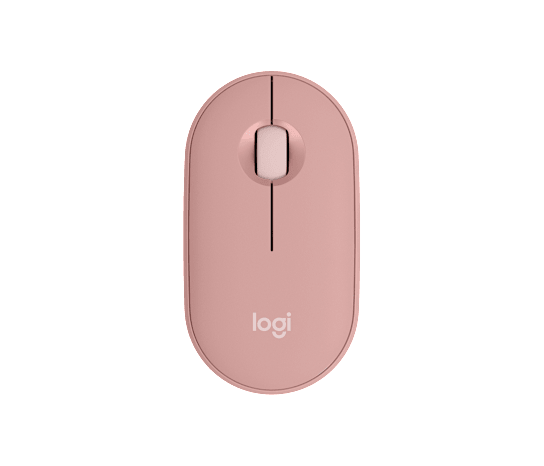
Pebble Mouse 2 M350s
The low-profile design is a candidate when packing space is a recurring constraint.
Before you buy: Its shape still needs a personal grip trial.
Price checked September 10, 2026. Retailer prices can change.M720 Triathlon Mouse
Extra controls are useful candidates for frequently repeated commands.
Before you buy: The right-handed contour and control layout may not suit you.
Price checked September 10, 2026. Retailer prices can change.Start with location, not feature count
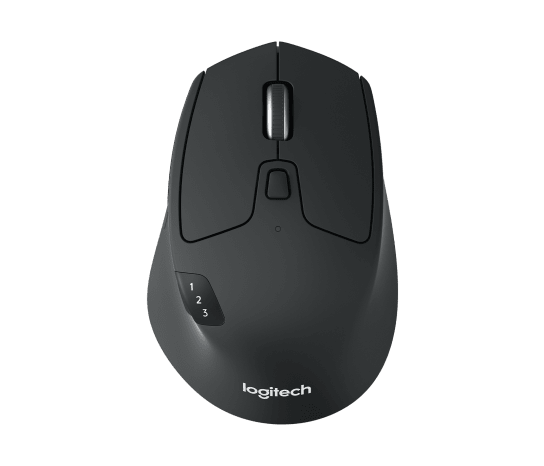
The Pebble listing emphasizes a slim body and a customizable middle button. The M720 offers a right-handed contour, thumb controls, and additional scrolling modes. These differences tell us what to evaluate; they do not prove that either mouse will feel comfortable or save time.
Picture the least convenient location where you regularly work. If you have a tiny bag pocket and only brief sessions away from your desk, portability deserves real weight. If most work happens in one place, packing convenience should have less influence than how naturally you can point, drag, and navigate. The mouse that disappears into your work is more useful than the one that wins a specification comparison.
Compare the complete connection cost
The checked US listings showed $24.99 for M350s and $44.99 for M720. The standalone Pebble uses Bluetooth with an optional separately purchased Logi Bolt receiver. M720 includes a Unifying receiver and also supports Bluetooth. Those receiver families should not be treated as interchangeable.
If Bluetooth already works reliably for your computer, the optional receiver may be irrelevant to the Pebble purchase. If an organization requires a particular connection method, check that requirement first. A lower sticker price can stop being lower once an adapter or receiver is added. Conversely, paying for an included connection option you will never use does not create value simply because it arrives in the box.
Give the M720 controls a specific purpose
The M720 makes the shortlist when you move through long documents all day or want commands under the thumb. Name two assignments you would genuinely use before counting the buttons as a benefit. A workflow already running on keyboard shortcuts leaves those controls untouched for years.
The Pebble can be enough when the task is ordinary pointing away from a desk. Its simpler control scheme is not inherently more efficient, but it asks less of a buyer who wants to pair a mouse and continue working. In either case, verify customization support on the operating systems you use. Device compatibility and identical software behavior are separate questions.
Do not force one mouse to win both jobs
Our decision would favor Pebble as a small secondary mouse and M720 as a potential desk upgrade, with comfort allowed to overturn either recommendation. A normal session is a better trial than a minute of moving a cursor in a store. Notice grip changes, missed controls, and whether you can use the wheel without thinking about it.
Keeping the desk mouse and adding a portable one is a legitimate outcome, and it is not the default. A desk mouse that packs well already ends the question. Two candidates that both feel wrong end it differently. Battery longevity and click noise are outside what this comparison can settle, and manufacturer productivity language does not fill that gap.
How we put this together
Built from the product pages and listings below, without test scores or results we have not measured. Specifications and prices change, so check the original page for the exact model, current price, delivery, and returns.
- Logitech: Pebble Mouse 2 M350s (opens in a new tab)
- Logitech Support: Getting started with M350s (opens in a new tab)
- Logitech: M720 Triathlon US listing (opens in a new tab)
- Logitech: M720 quick-start guide (opens in a new tab)