Product image supplied by the brand
In this guide
A seven-in-one hub is a list of compromises with one USB-C plug on the end. The interesting part of any hub page is not the port count but the ceilings: what refresh rate the HDMI port reaches at 4K, which USB ports run at 5 Gbps and which do not, and how many watts the hub keeps for itself before the laptop sees any. Anker's 341 USB-C Hub, model A8346, publishes all three, which is more than many hub makers manage.
The catch surfaced while checking prices. Anker's site also sells a product simply called USB-C Hub (7-in-1), model A83D2, at $25.99, and its description lists 4K at 60 Hz, 5 Gbps on the Type-C data jack, and the same 85 W pass-through. The 341 was $39.99 with a $14 off badge on September 11. So this review is partly a review of the hub and partly an explanation of why the same brand's cheaper hub is the one to compare it against.
Our verdict
The 341 does what its port list says, and Anker's page is candid about the limits: 30 Hz at 4K, a USB 2.0 rate on the Type-C data jack, 15 W lost to running the hub. The problem is internal to Anker. Its newer USB-C Hub (7-in-1) lists 4K at 60 Hz and 5 Gbps on the Type-C data jack for $25.99, with the same 85 W and the same 18-month term. Buy the 341 only if its long tested-device list or its stated card-slot spec matters to you.
- A good fit for
- Someone with an older MacBook, Chromebook or iPad on Anker's tested list who runs a 1080p monitor or is content with 30 Hz at 4K and wants a card reader in the same brick.
- We would skip it if
- You want 60 Hz at 4K, you move files through the Type-C data jack, or you have not yet compared it with the $25.99 Anker 7-in-1 on the same site.
Reasons to consider it
- A full specification list that keeps the awkward numbers in: HDMI 1.4, HDCP 2.2, no HDR, UHS-I card slots
- 85 W to the laptop from a 100 W charger, with the 15 W hub overhead stated up front and repeated in the FAQ
- The manual gives 140 g (4.94 oz) and a size, and the 18-month term matches Anker's policy table
The compromises
- 4K output is capped at 30 Hz, and the Type-C data jack is USB 2.0 at 480 Mbps despite the 5 Gbps headline
- Anker's newer 7-in-1 costs $25.99 and lists 4K at 60 Hz with 5 Gbps on every data port
- The 2018 manual says 77 W reaches the laptop while the page says 85 W, and Anker publishes both
What we have not verified: We have not connected this hub to anything. Anker does not state the cable length on the page; the manual gives an overall length of 330 mm that appears to include the cable. The two power figures, 85 W on the page and 77 W in the manual, may reflect a hardware revision, and Anker does not say which one ships today. The A83D2 comparison rests on Anker's description text, since that page has no specification list.
The things in this guide
A closer look at the products, who they may suit, and what to check before buying.
341 USB-C Hub · 7-in-1, 4K HDMI, 85W Pass-Through
Anker publishes a specification list, a FAQ, a manual with weight and size, and a long list of tested and untested devices, which makes it easy to know in advance whether it will work.
Before you buy: The 30 Hz cap at 4K and the USB 2.0 rate on the Type-C data jack are both beaten by Anker's own $25.99 7-in-1, so check that page first.
Price checked September 11, 2026. Retailer prices can change.Seven ports, read with their speeds
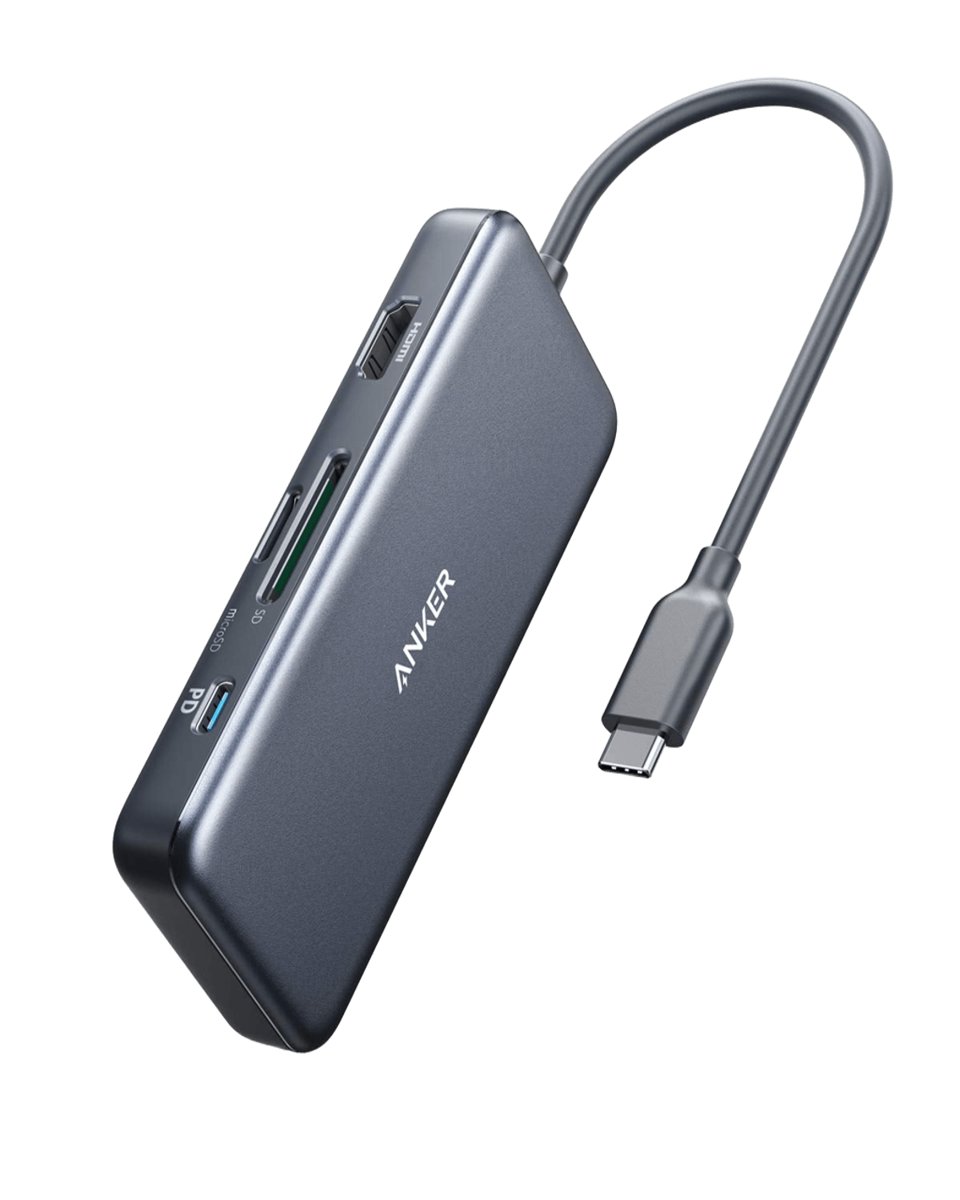
Anker's table lists one USB-C Power Delivery input rated 100 W in and 85 W out to the laptop, one HDMI port at 4K and 30 Hz, two USB-A data ports at USB 3.0 and 5 Gbps, one USB-C data port at USB 2.0 and 480 Mbps, one SD slot at UHS-I, and one microSD slot. The maximum data transfer line says 5 Gbps. That is accurate for the USB-A ports and not for the Type-C jack, which runs at roughly a hundredth of that rate.
The marketing copy further down the page says files move at up to 5 Gbps through the Type-C data jack and the two USB-A ports. The specification list above it disagrees on the Type-C jack, and when a specification list and a sales paragraph conflict, the list is the one to trust. In practice this means the Type-C data jack is a place for a mouse receiver or a phone charging at 5 V, not for an external SSD. A buyer who means to hang fast storage off this hub should use the USB-A ports and an adapter cable.
4K at 30 Hz, HDMI 1.4, no HDR
The display line reads HDMI 1.4, no HDR, HDCP 2.2, and the resolution ceiling is 4K at 30 Hz. At 1080p or 1440p the refresh rate is not the constraint and the hub will drive a normal office monitor without complaint. At 4K, 30 Hz is enough for documents and video playback and is visibly slow for cursor movement and scrolling, which is why most people who buy a 4K monitor expect 60 Hz. HDCP 2.2 means protected streaming content should play on a compatible display.
Anker's FAQ closes off the other route to a second screen. Video is supported only through the HDMI port; the two Type-C connections on the hub will not carry a display signal even with an adapter cable from USB-C to HDMI or DisplayPort. The page also names a list of laptops that do not support video over their own Type-C connection at all, including several ASUS VivoBook and ZenBook models, a Lenovo IdeaPad and an Acer Aspire 5, in which case no hub will help. That list is the most useful thing on the page for a buyer with a budget Windows laptop.
100 W in, 85 W out, and the manual's 77 W
Pass-through charging is where hub makers are usually vague and Anker is not. The page states that the hub takes up to 100 W on its PD port, keeps 15 W for its own operation, and passes up to 85 W to the laptop. The FAQ repeats that a 100 W charger and cable are needed to reach the 85 W figure, that neither is included, and that only the PD port charges anything; the USB-A ports and the Type-C data jack do not.
The welcome guide Anker links from the same page, dated November 2018, gives a different split: 77 W for the laptop and 23 W for the hub. Both documents come from Anker and both describe the A8346. The likeliest explanation is a firmware or hardware revision since the manual was printed, but Anker does not say so. Either figure charges a 13 inch laptop at full speed; the difference matters only for a 16 inch machine that wants more than 77 W. Anker also notes the hub is not suited to pass-through charging of iPad Pro or phones with their original small chargers, and that iPad Pro needs a 45 W adapter with a 15 V profile to charge at full speed.
The $25.99 hub on the same site
Anker's USB-C Hub (7-in-1), model A83D2, lists HDMI at 4K and 60 Hz, two USB-A 3.0 ports and one USB-C data port at 5 Gbps each, a 100 W PD input with 85 W to the laptop, SD and TF slots, and an 18-month term, for $25.99 on September 11 with a $6 off badge. On every number the two hubs share, the A83D2 matches or beats the 341, and it costs $14 less. The A83D2 page has no specification list, only description text, so its HDMI version, HDCP level and card-slot bus class are not stated.
One step up, the Nano USB-C Hub (8-in-1, Dual Display), model A210B, is $35.99 and lists two HDMI outputs at 4K and 60 Hz, 10 Gbps on every USB port, and the same 85 W after a 15 W reserve, with the caveat that macOS mirrors both displays. Against those two, the 341 at $39.99 is the oldest and most expensive of the three. The bulk price of $27.37 each for ten or more units is a hint about where Anker sees it selling now. For scale, Anker's 240 W braided cable in the same subcategory is $19.99, so the 341 costs two of those.
Tested devices, 140 g, and 18 months
The tested list on the page runs from the 2015 through 2018 MacBook and MacBook Pro in the specification list to the 2016 through 2020 MacBook Pro, 2018 through 2020 MacBook Air and 2017 Pixelbook in the description, plus iMac and Chromebook Pixel models. The incompatible list names the Nintendo Switch, Apple's USB SuperDrive and the original XPS 13 stock adapter. Supported systems are Windows XP through 10, Mac OS X 10.6 or later, Linux 2.6.14 or later and iPadOS, and the FAQ states that iPad Pro works once updated to iPadOS. Nothing newer than 2020 is named, which is a sign of the page's age, not necessarily of a compatibility problem.
The welcome guide fills in what the page omits: 330 by 55 by 16 mm (13.0 by 2.2 by 0.6 inches), which reads as the length with the attached cable stretched out, and 140 g (4.94 oz). Anker's policy table puts hubs and adapters at 18 months, the box contents on the page say 18 months, and the manual says the same, so there is no ambiguity on the term. Undamaged products can be returned for a full refund inside 30 days, and the coverage is void if the hub leaves the country of purchase.
When to skip it
Skip the 341 if you have a 4K monitor and expect 60 Hz; the page says 30 Hz and does not hedge. Skip it if your fast storage plugs in over USB-C, because the only USB-C data port is USB 2.0. Skip it if the price is the deciding factor, since Anker's A83D2 lists better numbers for $25.99 and the same 18-month term. Skip it entirely if your laptop is on Anker's list of machines whose Type-C connection carries no video, because in that case the HDMI port on any hub is dead weight.
The case for buying it anyway is narrow and specific. The 341's page documents more than the cheaper hub's does: the HDMI version, the HDCP level, the card-slot bus class, a manual with weight and size, and a long list of laptops Anker says it has tested. A buyer with a 2016 to 2020 MacBook, a 1080p monitor and a camera that shoots to SD cards gets exactly what the table promises for $39.99. Everyone else should open the A83D2 page before deciding.
How we put this together
Built from the product pages and listings below, without test scores or results we have not measured. Specifications and prices change, so check the original page for the exact model, current price, delivery, and returns.
- Anker: 341 USB-C Hub (7-in-1), model A8346 (opens in a new tab)
- Anker: A8346 welcome guide (PDF, dated November 2018) (opens in a new tab)
- Anker: USB-C Hub (7-in-1), model A83D2 (opens in a new tab)
- Anker: Nano USB-C Hub (8-in-1, Dual Display), model A210B (opens in a new tab)
- Anker: Return and Refund Policy, standard warranty period table (opens in a new tab)
- Anker: USB-C to USB-C Cable (240W, Upcycled-Braided), model A82E2 (opens in a new tab)