Product image supplied by the brand
In this guide
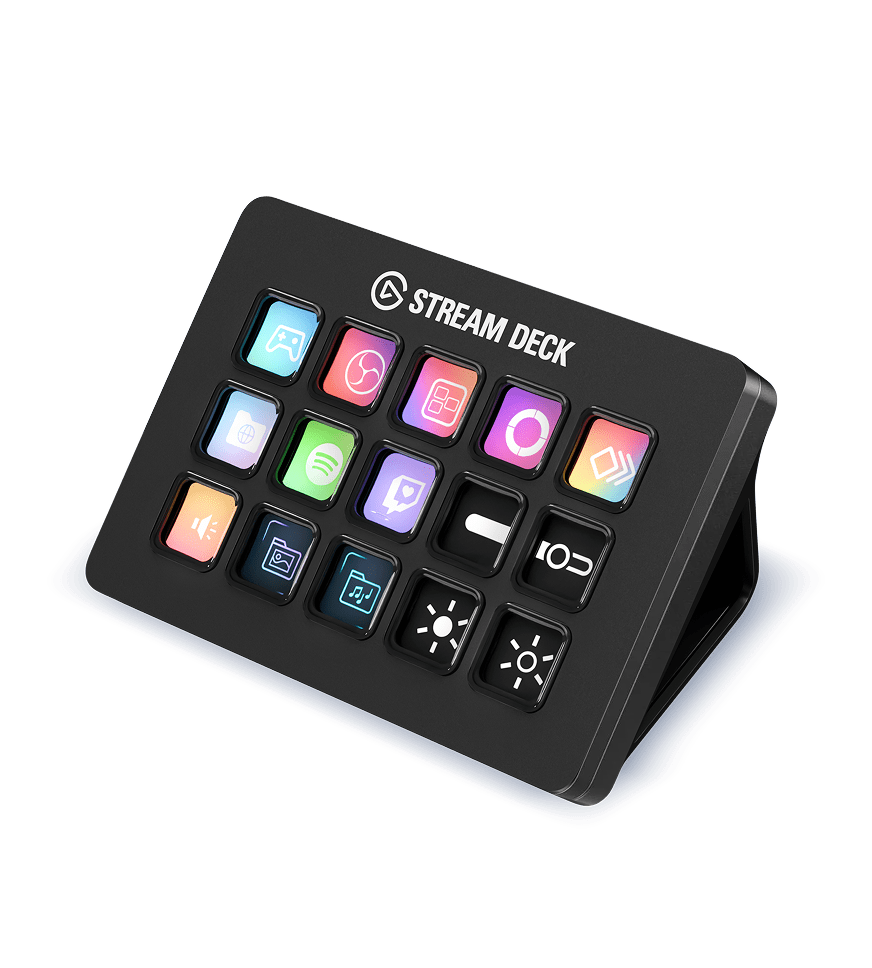
The Stream Deck is fifteen small screens in one pad, each one firing whatever you assign to it. Elgato sells the black version for $149.99 in the US, listed as in stock on 2026-10-18, and the package contains the pad, a desktop stand, a printed guide and a 150 cm USB-C cable. Power and data both arrive over that cable.
The hardware is the easy part to describe: 118 by 84 by 25 millimeters, 145 grams without the stand. The decision is about the software. Every key's image, label and action is configured in Elgato's free app, which requires Windows 11 or macOS 13, and the pad does nothing at all until that app is running on a connected computer.
Our verdict
Buy the $149.99 Stream Deck if eight or more actions repeat every hour in software you keep open. The hardware is simple; Elgato's app is where the value and the upkeep live.
- A good fit for
- A desk worker who repeats the same shortcuts in one or two applications all day, has the computer on whenever they work, and already runs Windows 11 or macOS 13.
- We would skip it if
- You move between several computers, your system is older than Windows 11 or macOS 13, or you need a controller that works with the computer switched off.
Reasons to consider it
- Fifteen keys with individual images, in a footprint of 118 by 84 millimeters.
- A desktop stand sets it at an angle, and the single cable carries power and data.
- Elgato's app, a free download, adds plugins and Multi Actions, so one press can chain several steps.
The compromises
- Windows 11 or macOS 13 is a firm requirement; an older machine needs an operating-system upgrade first.
- Every key's image and action lives in the app, so the pad is blank plastic when the software is not running.
- The 150 cm cable is the only connection; there is no wireless mode.
- A phone version of the same software exists, which weakens the case for occasional use.
What we have not verified: Elgato's US product page does not publish a warranty period, so the coverage behind the $149.99 is unknown. Whether the plugin ecosystem stays free, and whether layouts survive future app versions, are also unstated.
The things in this guide
A closer look at the products, who they may suit, and what to check before buying.
Stream Deck
Fifteen keys that each show their function, a stand that angles them toward you, and one cable for power and data, all driven by Elgato's free app and its plugin library.
Before you buy: Needs Windows 11 or macOS 13, does nothing without the app, and its only connection is a 150 cm cable.
Price checked October 18, 2026. Retailer prices can change.What fifteen keys take up on a desk
The pad measures 118 by 84 millimeters, and the desktop stand lifts its back edge so the keys face up at an angle rather than lying flat. It weighs 145 grams without the stand and 270 grams with it.
One cable does everything: USB 2.0 data and power over a 150 cm USB-C to USB-C lead with a 90-degree connector. The pad draws its power from the computer it serves, and that is also how it stays connected. The stand adds 125 grams, which matters only if you carry it between desks.
The app is the product
A key is a small screen and a switch. What makes it useful is the action behind it: a hotkey, a chain of steps in a Multi Action, or a plugin command that talks to an application directly. Elgato's own page lists plugins, Multi Actions, Smart Profiles that switch layouts per application, faceplates and screensavers among the things the software manages.
The maintenance sits in the same place. Every key you rely on has an image and an action stored in the app, and the software is what executes them. A computer that has not booted, or an app that has not started, leaves fifteen blank keys. The hardware asks nothing of you; the configuration asks for setup time up front and a willingness to keep it current.
The Windows 11 floor
Elgato's requirements are Windows 11 or newer, or macOS 13 or newer, each needing a USB-C port and the free Stream Deck download. The floor is higher than a keyboard or a mouse imposes. A working desktop on Windows 10, or a Mac held at macOS 12, has to be upgraded before the $149.99 buys anything.
The gap is sharper than it looks, because Elgato's own phone app runs on Windows 10 and macOS 10.15 while the hardware asks for Windows 11 and macOS 13. A machine too old for the $149.99 pad is new enough for the app that turns a phone into the same fifteen keys, so an older machine can only drive the keys from a phone.
What a shortcut already does, and where the pad differs
Every action on these keys can be triggered some other way: a keyboard shortcut, a macro recorded in the application, or a menu. The pad does not add capability. It adds a fixed, labeled surface where the same actions always sit, which removes the step of remembering which combination belongs to which app.
The difference is real for work that repeats, and vanishes for work that does not. Eight or more actions used dozens of times in a working day justify a $149.99 surface because the labels are always visible. Used twice a week, the same eight do not, and Elgato's phone app covers that case on iOS 15 or Android 9 with Stream Deck 6.3 or newer on the computer and a Wi-Fi link to the computer.
Where the pad stops paying for itself
The cases that do not work are easy to name. A laptop that moves between offices and home gets the pad only at the desk where it lives. A machine below the system floor gets nothing.
The strongest case is a fixed desk, one primary computer, and a job where the same eight to fifteen actions recur in the same applications: muting a call, moving a window, starting a recording, inserting a saved block of text. The pad is a convenience with a clear boundary, and the boundary is the software.
Who should skip it
Skip it if your work changes applications every week, or if the $149.99 has to compete with a better keyboard or a second monitor for the same desk budget. Skip it if the operating system is older than Windows 11 or macOS 13 and you are not planning to upgrade.
Buy it when a fixed desk, one main computer and a repetitive workflow are all true at once. Then the fifteen keys do the one thing a keyboard shortcut cannot: they show you what they will do before you press them.
How we put this together
Built from the product pages and listings below, without test scores or results we have not measured. Specifications and prices change, so check the original page for the exact model, current price, delivery, and returns.
- Elgato: Stream Deck product page (US) (opens in a new tab)
- Elgato: Stream Deck white variant listing (opens in a new tab)
- Elgato: Stream Deck Mobile page (US) (opens in a new tab)