Product image supplied by the brand
In this guide
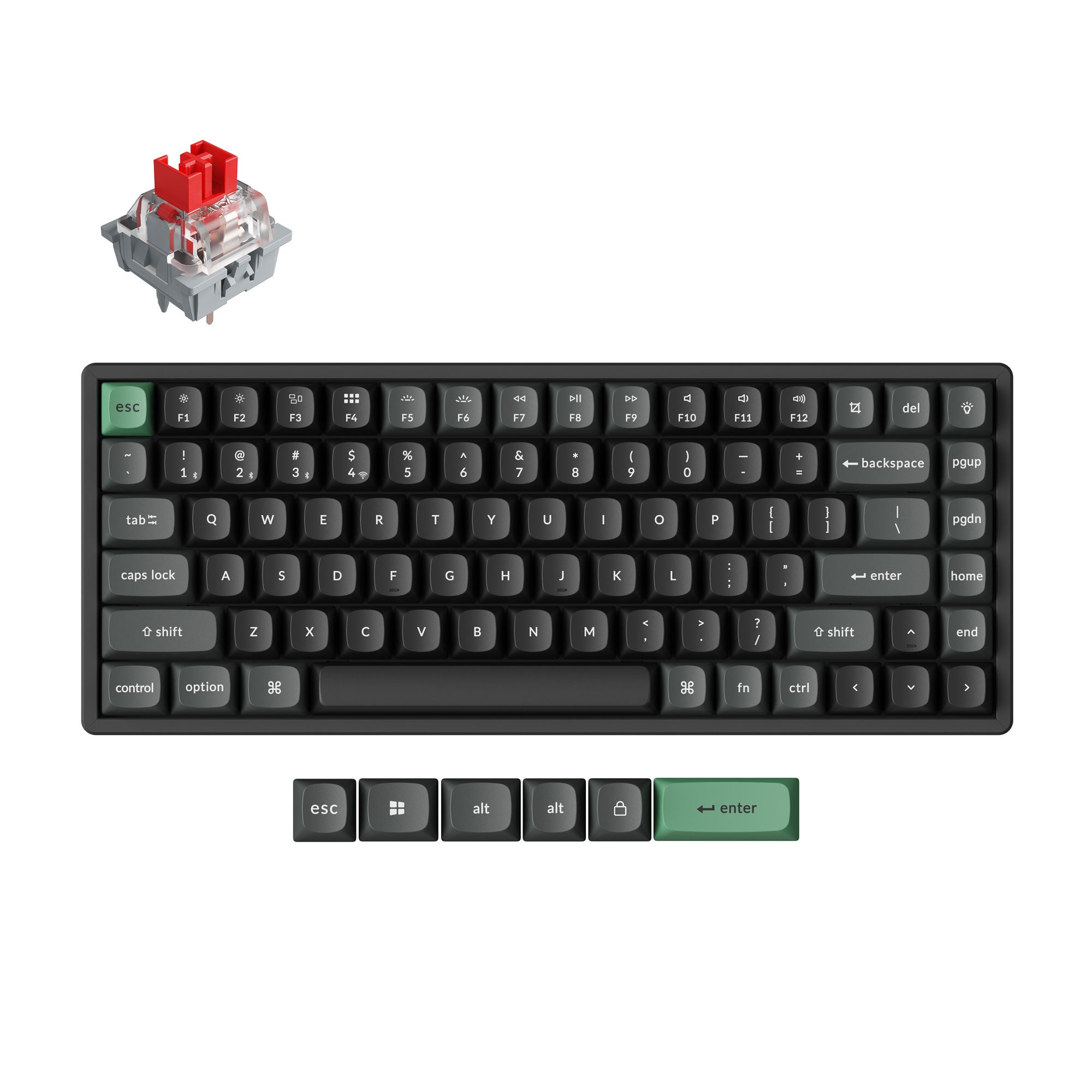
Keychron's K Ultra line pairs 2.4 GHz wireless with ZMK firmware, and the K2 Ultra 8K is the 75% board in it at $119.99 in Red, Brown or Banana switches. The same layout is sold as the K2 v3 from $109.99, the K2 Max from $114.99 and the magnetic-switch K2 HE from $139.99, and all three siblings run QMK.
The Ultra's case is the report rate: 8,000 Hz on the cable and on the 2.4 GHz dongle, eight times the 1,000 Hz the K2 v3, the K2 Max and the K2 HE are each rated at. Bluetooth is the link it does not fix, at 125 Hz, which two siblings match and the Max undercuts at 90 Hz. The 8,000 Hz figure is a cable-and-dongle feature, and no other K2 matches it.
Our verdict
The K2 Ultra 8K is the family's only 8,000 Hz board and costs $5 less than the aluminum K2 Max, which is the board to pick if you want 2.4 GHz with VIA instead.
- A good fit for
- A desk keyboard for the buyer who will run the cable or the 2.4 GHz receiver, values the 75% K2 line's highest report rate, and is willing to build keymaps in ZMK.
- We would skip it if
- You need VIA keymaps, you plan to run it on Bluetooth, or you want the 813 g K2 v3 instead of a 1,084 g board.
Reasons to consider it
- The only 8,000 Hz report rate in the 75% K2 line, on the cable and on the 2.4 GHz receiver; the v3, the Max and the HE top out at 1,000 Hz
- A 4,000 mAh cell Keychron rates at up to 760 hours with the backlight off and 225 hours at its lowest backlight, both stated for 8K mode
- The 2.4 GHz receiver, its extension adapter, the USB-C cable, a keycap and switch puller, a screwdriver and a hex key are all included
The compromises
- The 8,000 Hz rate covers only the cable and the dongle; on Bluetooth the board reports at 125 Hz, the family norm but also the link it falls back to when unplugged
- ZMK and Keychron Launcher in place of QMK and VIA, which the $124.99 K2 Max keeps alongside its own 2.4 GHz link, so existing VIA keymaps have to be rebuilt
- The keycaps are non-shine-through PBT by Keychron's own description, so the south-facing RGB lights the desk around the keys and not the legends
What we have not verified: The 8,000 Hz rate is a report interval: Keychron publishes no switch scan time, debounce setting or wireless-hop figure, so whether the step up from 1,000 Hz is perceptible in typing or in play is unmeasured here. The socket type appears only on Keychron's Amazon listing, which says 3-pin and 5-pin MX-style switches fit; keychron.com leaves it out of the specifications.
The things in this guide
A closer look at the products, who they may suit, and what to check before buying.
K2 Ultra 8K
8,000 Hz on the dongle and the cable against 1,000 Hz for every other 75% K2, the longest battery claim in the family, a full accessory set in the box including the 2.4 GHz receiver, and a $5 saving on the aluminum K2 Max.
Before you buy: Bluetooth reports at 125 Hz, the keycaps are non-shine-through PBT so the legends are not backlit, and the ZMK firmware means VIA keymaps have to be rebuilt; the $124.99 K2 Max is the 2.4 GHz board that keeps VIA.
Price checked September 30, 2026. Retailer prices can change.Four prices for one layout
Keychron's 75% K2 boards run from $109.99 to $199.99, and the orderable set on 2026-09-29 was narrower than the price list suggests. The K2 v3's $89.99 and $99.99 tiers showed as out of stock, leaving a $109.99 ABS-frame board in Red switches and a $119.99 aluminum one in Red, Brown or Banana. The K2 Max was orderable at $114.99 in aluminum without hot-swap and $124.99 with it. The Ultra is $119.99, and the K2 HE started at $139.99 with its $129.99 standard tier sold out.
Set the Ultra against the Max, the board it shares the most with. The Ultra costs $5 less than the Max's hot-swap aluminum version and $5 more than its non-hot-swap one, and the two weigh 1,084 g and 1,080 g. The plate, the keycap profile, the battery capacity and the 75% layout are common to both, so what the Ultra's money buys is the report rate and a different firmware, not the frame.
8,000 Hz on two links, 90 to 125 on the third
Each board's spec block puts its report rate on the record. The Ultra runs 8,000 Hz wired and over 2.4 GHz, and 125 Hz over Bluetooth. The K2 v3 runs 1,000 Hz wired and 125 Hz over Bluetooth, with no 2.4 GHz link at all. The K2 Max runs 1,000 Hz on 2.4 GHz and wired, and 90 Hz over Bluetooth. The K2 HE runs 1,000 Hz wired and over 2.4 GHz, and 125 Hz over Bluetooth.
So the Ultra's advantage is an eight-to-one gap on the two links where a keyboard is not on Bluetooth, and its Bluetooth figure is the family norm: two siblings report at 125 Hz and the Max is slower at 90 Hz. Between reports, 8,000 Hz is 0.125 ms and 1,000 Hz is 1 ms, so the Ultra shortens the interval by 0.875 ms on the cable and the dongle.
What none of the spec blocks covers is the rest of the path. There is no switch scan time, no debounce setting and no wireless-hop figure, so the rate describes the interval between reports, not how long a keypress takes to become a character. The 8,000 Hz number is the one measurable difference between these boards, and it is also the one whose effect on typing is not published.
ZMK here, VIA everywhere else
The Ultra runs ZMK and is remapped in a browser through Keychron Launcher, and its spec block lists no VIA or QMK support. The K2 v3, the K2 Max and the K2 HE all list QMK and VIA, with the v3 and the Max also offering the Launcher web app. A buyer carrying VIA keymaps or QMK build scripts into a new board keeps them on the Max, the family's 2.4 GHz board that still speaks VIA. On the Ultra that work goes into ZMK instead, which is a port rather than an upgrade.
The switch lines split the same way. The Ultra uses Keychron's Apex switches and the v3 and Max use its Super switches, all three in Red, Brown and Banana, and the HE uses Gateron's double-rail magnetic switches with rapid trigger and an actuation point adjustable from 0.2 mm to 3.8 mm. No published measurement sets Apex against Super, so that part is a preference. The HE has the narrowest socket of the four: Keychron states it takes Gateron's double-rail magnetic switches and nothing else.
One gap separates the boards on hot-swap. The v3 and the Max name their sockets, taking almost all 3-pin and 5-pin MX-style switches and any normal-profile MX switch respectively. The Ultra's block on Keychron's site says hot-swappable and names no socket, while Keychron's own Amazon listing says it takes both 3-pin and 5-pin MX-style switches.
760 hours claimed, 1,084 grams on a desk
All four carry a 4,000 mAh cell and the runtime claims are not close. Keychron rates the Ultra at up to 760 hours with the backlight off and 225 hours at its lowest brightness, both tagged to 8K mode. The K2 v3 is rated at around 190 hours over Bluetooth with the backlight off and around 100 hours in RGB at lowest brightness, and the K2 Max at around 190 hours wireless with the backlight off and around 100 hours in RGB, with no radio named. The K2 HE is rated at up to 110 hours with no backlight condition stated.
The Ultra's 760 is four times the 190 that the v3 and the Max are rated at, and its 225 is more than twice their 100, all on the same capacity. The qualification is that only the Ultra's figures name both the polling mode and the backlight state; the v3's 190 is labeled Bluetooth, and the Max's 190 names no radio at all, so treat the ratio as a gap between claims, not a measured result.
Weight separates the Ultra and the Max far less than the firmware does. The Ultra is 311.50 x 121.54 mm at 1,084 g, plus or minus 10 g, with a 22.85 mm front height and a 31.20 mm back height without keycaps. The Max in its aluminum frame is 316.62 x 126.56 mm at 1,080 g, four grams lighter, so the CNC body does not show up on a scale. The lightest of the four is the K2 v3's plastic frame at 311.14 x 121.14 mm and about 813 g, and the K2 HE is 316.4 x 126.7 mm at 980 g.
Twelve months, seven days, and one box
Keychron's warranty runs twelve months from delivery, and keycaps and palm rests get three. On the K Ultra series even a covered defect is remedied by replacing the faulty part, not the whole keyboard. A bad switch or key is fixed with a replacement part, not a new keyboard.
Returns are tighter than the warranty. A return for reasons other than a fault has to be requested within seven days after it arrives, the refund covers the product cost only, and the buyer arranges and pays the return shipping. EU buyers have a 14-day right of withdrawal. Amazon is the longer window: Keychron's own store there sold all three switch versions at the same $119.99 on 2026-09-30, fulfilled by Amazon and returnable free for 30 days.
Nothing recurs after the purchase. The box graphic lists the keyboard, the USB-C cable, an A-to-C adapter, the 2.4 GHz receiver and an extension adapter for it, the keycap and switch puller, a screwdriver and a hex key, so using either wireless link needs no second order. Launcher is a browser app and ZMK is open source, so there is no subscription and no software license, and the add-ons Keychron lists beside the board are coiled cables at $19.99.
Which K2 to buy
The Max is the board for a 2.4 GHz desk that runs VIA. It reports at 1,000 Hz on the dongle and the cable, keeps QMK and VIA, and costs $124.99 in aluminum with hot-swap or $114.99 without it, so a buyer whose keymaps are already VIA does not repeat that work. It gives up the 8,000 Hz rate and the 760-hour claim.
The v3 is the Bluetooth desk's board, and its orderable $109.99 configuration is the ABS frame in Red switches only. If Brown or Banana switches are the requirement, the v3 costs $119.99, which is the Ultra's price, and the Ultra's dongle and 8K rate then come free with the aluminum case.
The Ultra is the pick when the cable or the 2.4 GHz receiver is the plan and ZMK is acceptable. Its report rate is the family's only 8,000 Hz and no sibling matches it on that link. The Bluetooth mode is the part not to pay for.
The K2 HE answers a different question. Magnetic switches with rapid trigger and actuation adjustable from 0.2 mm to 3.8 mm are what the $199.99 resin and concrete editions and the $139.99 black Special Edition buy, on 1,000 Hz polling, the same 125 Hz Bluetooth as the Ultra and a 110-hour rating, with the $129.99 standard tier out of stock. Buy it for the switch, not the connection.
How we put this together
Built from the product pages and listings below, without test scores or results we have not measured. Specifications and prices change, so check the original page for the exact model, current price, delivery, and returns.
- Keychron: K2 Ultra 8K Wireless Custom Mechanical Keyboard (opens in a new tab)
- Keychron: K2 QMK Wireless Mechanical Keyboard (Version 3) (opens in a new tab)
- Keychron: K2 Max QMK Wireless Mechanical Keyboard (opens in a new tab)
- Keychron: K2 HE Wireless Magnetic Switch Custom Keyboard (opens in a new tab)
- Keychron: K2 HE Wireless Magnetic Switch Custom Keyboard - Resin Edition (opens in a new tab)
- Keychron: Warranty (opens in a new tab)
- Keychron: Refund policy (opens in a new tab)
- Amazon: Keychron K2 Ultra 75% Wireless Mechanical Keyboard, 8000Hz (ASINs B0GQLPPTW5, B0GQLPYDLQ, B0GQLSRB8Y) (opens in a new tab)