Product image supplied by the brand
In this guide
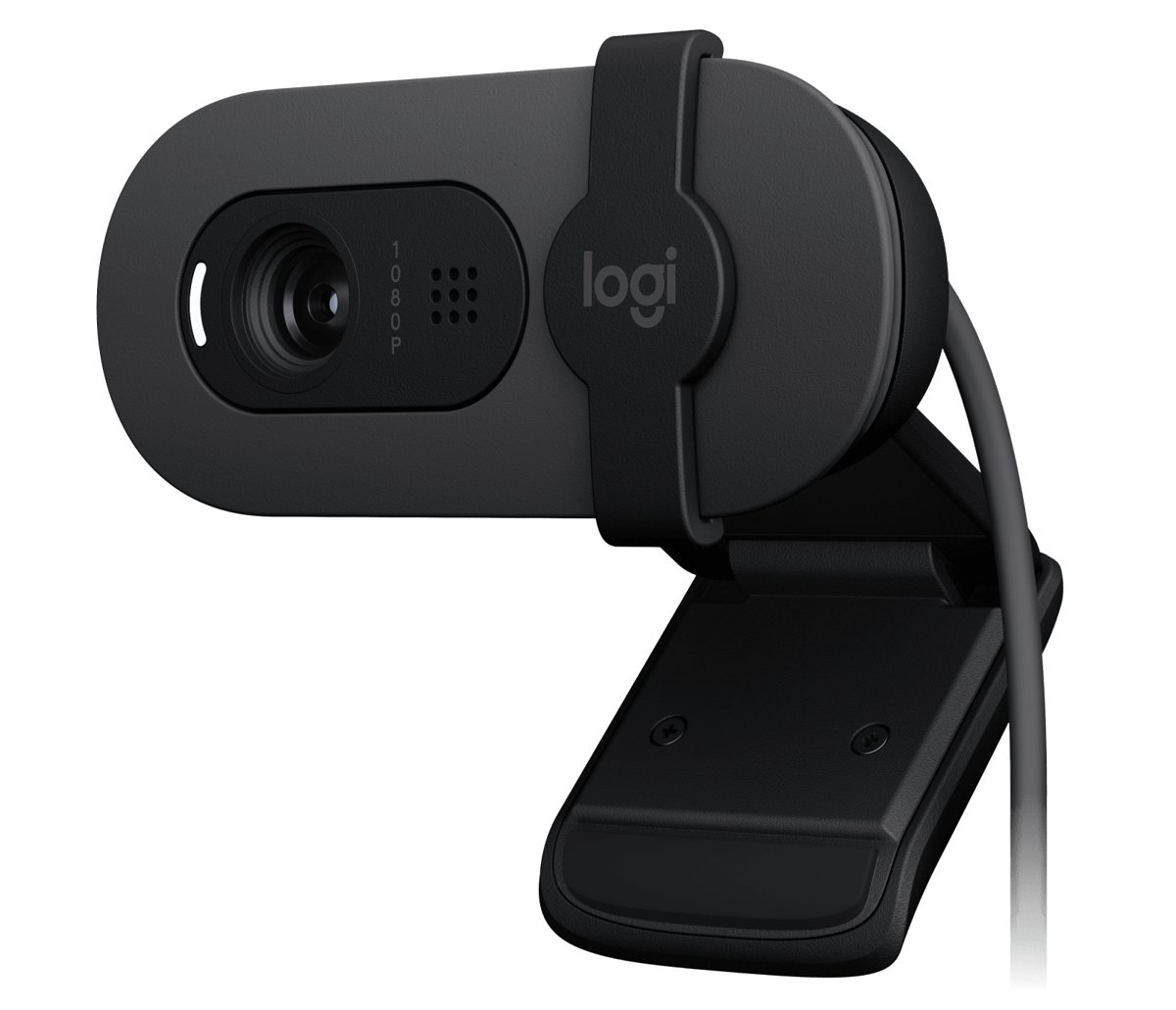
Logitech's US store prices the Brio 100 at $29.99, marked down from a $39.99 list price, in Graphite as part number 960-001580 and in Off-White as 960-001616. The specs tab reads like a deliberate minimum: 1080p at 30 fps or 720p at 30 fps from a 2 MP sensor, a fixed-focus four-element plastic lens with an anti-reflective coating, a 58 degree diagonal field of view, one omnidirectional microphone rated to 3 feet, an integrated privacy shutter, and a captive 1.5 m USB-A cable. The body is 2.87 inches wide, 1.26 inches tall, 2.62 inches deep, and weighs 2.65 ounces.
Nothing in this article comes from using the camera; it is built from Logitech's product page for the Brio 100 and, for comparison, its page for the C920s. The useful way to read a $30 webcam is to ask which omissions are cosmetic and which are structural. A missing tripod thread is cosmetic. Fixed focus and a single microphone are structural, because they decide how you have to sit and how your room has to sound. The sections below take each spec line in that order, then compare the two Logitech cameras directly, and finish with the cases where the cheaper one is the wrong buy.
Our verdict
A reasonable $29.99 answer for someone who sits about an arm's length from a laptop and wants a sharper picture than a built-in camera, with a shutter that closes for good measure. Its fixed focus and single mic are the reasons to pay double for the C920s if you move around or share the frame.
- A good fit for
- Remote workers and students on video calls from a fixed seat, on Windows 10 or later, macOS 10.15 or later, or ChromeOS, who want a plug-and-play USB-A camera and a physical privacy shutter without installing software.
- We would skip it if
- You stand up, lean in, or hold objects to the camera during calls, you need two people in frame, you want a stereo or noise-cancelling microphone, or your machine only has USB-C ports and no adapter.
Reasons to consider it
- Logitech lists both video modes plainly, 1080p at 30 fps and 720p at 30 fps, and gives the RAM guidance to match: 2 GB for 1080p streaming, 1 GB for 720p
- The privacy shutter is integrated, so there is no separate clip-on cover to lose, and the camera works without Logitech software on Windows, macOS, and ChromeOS
- At 2.65 oz with a 1.5 m attached cable and a 58 degree field of view, it is sized for a laptop lid and frames one person without pulling in the whole room
The compromises
- Focus is fixed, and the lens is a four-element plastic design, so anything closer or farther than the factory focus distance goes soft with no way to correct it
- One omnidirectional microphone rated to 3 ft (1 m) means room noise and a second voice arrive at the same level as yours; the C920s lists a stereo mic at the same range
- The plug is USB-A on a captive cable, so a laptop with only USB-C ports needs an adapter, and the spec list does not describe the mount or any tripod thread
What we have not verified: Logitech's spec list does not state the focus distance, the mount design, a tripod socket, an autofocus alternative, or whether the sensor is 1080p native or scaled from the stated 2 MP. The box list is only the webcam and user documentation. The Off-White variant (960-001616) showed the same $29.99 price, but we checked only logitech.com and only the US store. We did not locate a standalone Logitech warranty document; the coverage term comes from the specs tab on Logitech's own listing.
The things in this guide
A closer look at the products, who they may suit, and what to check before buying.
Brio 100 Full HD Webcam · 960-001580
For $29.99 Logitech lists 1080p30, a 58 degree field of view that keeps one person in frame, an integrated shutter, RightLight 2 exposure correction, and plug-and-play support on Windows 10, macOS 10.15, and ChromeOS, all on a 75 g body with a captive cable.
Before you buy: Fixed focus is permanent. The $59.99 C920s on the same store lists autofocus, a glass lens, a 78 degree field of view, and a stereo microphone, which is the upgrade path for anyone who leans in, stands up, or shares the frame.
Price checked September 11, 2026. Retailer prices can change.1080p at 30 fps from a 2 MP sensor
The two listed modes are 1080p at 30 fps (1920 by 1080) and 720p at 30 fps (1280 by 720). The sensor is described only as 2 MP, which is a little under the 2.07 million pixels a 1080p frame needs, so the camera is delivering its top mode at close to native resolution with no headroom for cropping or digital zoom, and Logitech lists no zoom for it. There is no 60 fps mode at any resolution, and no 4K, which places it squarely as a call camera and not a capture device.
Logitech pairs those modes with memory guidance that is unusual to see printed: 2 GB of RAM or more for 1080p streaming, and 1 GB typically for 720p. That is low enough to cover any machine that can run a current browser, so the constraint in practice is the calling service's own resolution cap, not the camera. RightLight 2 is listed as auto-light balance for difficult lighting, and Logitech's brightness claim, up to 50 percent brighter on the subject's face, is explicitly measured against its own older C270 in a controlled setup, so treat it as a comparison to a previous budget model and not a general figure.
Fixed focus and a 58 degree field of view decide how you sit
Focus type is listed as fixed, and the lens as a custom four-element plastic design with an anti-reflective coating. Logitech does not publish the focus distance or the depth of field, so the only safe reading is that the camera is tuned for a typical seated distance from a laptop and that sharpness falls off on either side of it. Leaning into the screen to read something, holding a document up to the lens, or stepping back to a whiteboard are all movements that autofocus would track and this camera will not.
The 58 degree diagonal field of view is narrow by webcam standards; the C920s lists 78 degrees. Narrow has a real upside for a single person at a desk, because less of the room and fewer passers-by end up on screen, and the subject fills more of the frame. The downside arrives the moment two people need to share a call from one laptop, or the camera sits on a monitor far enough back that a narrow angle crops shoulders. Since the lens is fixed and there is no zoom, the framing you get at your seat is the framing you keep.
One omnidirectional mic, and a shutter that is part of the body
The microphone is a single omnidirectional capsule with a stated range of up to 3 feet (1 meter). Omnidirectional means it picks up sound from all sides at roughly equal sensitivity, so a keyboard, a fan, or a family member behind you are captured at the same level as your voice at the same distance. Logitech lists no noise reduction or beamforming for it. The 3 foot figure also lines up with the fixed-focus reading above: this camera assumes you are close and in one place.
The privacy shutter is built into the housing and slides across the lens, which is the feature most clearly ahead of its price. The C920s at $59.99 ships its shutter as a separate part in the box. A built-in shutter cannot be lost, does not add depth to the camera, and gives a visible physical state that software indicators cannot fake. For a camera that will spend most of its life clipped to a laptop that also gets used for other things, the shutter is a stronger argument than the resolution line.
USB-A only, two items in the box, and a one-year hardware term
System requirements are an available USB port and Windows 10 or later, macOS 10.15 or later, or ChromeOS, with the note that it works with virtually any popular video calling platform; Logitech names Teams, Meet, and Zoom on the page. The connector is USB-A on a captive 4.92 ft (1.5 m) cable, so a laptop with only USB-C ports needs an adapter or a hub, and there is no way to swap the cable for a shorter or longer one. The box contains the webcam and user documentation, nothing else.
Coverage is listed on the specs tab as a limited hardware warranty of one year. Logitech's store adds free standard shipping in three to five business days on orders of $29 and above, which this camera clears by 99 cents, and free returns within 30 days of purchase. The Graphite body is stated to contain 77 percent certified post-consumer recycled plastic, excluding packaging, the circuit board, cables, and the microphone, with a published carbon footprint of 6.29 kg CO2e. The spec list does not address the mount, a tripod thread, or a monitor clip, so anyone planning to put it on a desktop display should expect to check that separately.
What the extra $30 for the C920s actually buys
On the same store the C920s (960-001257) lists at $59.99 against a $69.99 list price. Its spec differences over the Brio 100 are autofocus, a glass lens, a 3 MP sensor, a stereo microphone, a 78 degree diagonal field of view, 1.2x digital zoom, and a tripod-ready universal mounting clip described as fitting laptops and monitors. Resolution and frame rate are identical at 1080p30 and 720p30, and both share a 1.5 m attached USB-A cable and the same 3 foot microphone range.
The C920s also weighs 5.71 oz to the Brio 100's 2.65 oz, more than double, and it ships the privacy shutter as a separate piece. So the trade is clear: the cheaper camera is lighter, has the better shutter design, and costs half as much; the dearer one focuses, hears in stereo, sees wider, and mounts on a tripod. For a person who moves during calls, or who occasionally has a second person at the desk, the $30 gap is the price of not having to think about where to sit. For a person who does neither, the Brio 100's list covers the job.
When to skip the Brio 100
Skip it if you move during calls or use the camera to show physical things, because fixed focus cannot follow you and Logitech publishes no focus distance to plan around. Skip it if two people regularly share the frame, since 58 degrees is narrow and there is no zoom or crop to reframe. Skip it if audio quality matters more than video, because one omnidirectional microphone rated to 3 feet is the least specified part of the camera, and a headset or a separate mic will do more for how you sound than this webcam will.
Also pass if your laptop has only USB-C ports and you do not want a dongle on a captive cable, or if you need the camera on a tripod or a monitor arm, because the spec list never describes the mount. In all four cases the C920s at $59.99 answers the specific gap with autofocus, a wider lens, stereo sound, and a tripod-ready clip. The Brio 100 is the right buy for one seated person at a laptop who wants 1080p, a shutter, and nothing to install, and it is priced accordingly.
How we put this together
Built from the product pages and listings below, without test scores or results we have not measured. Specifications and prices change, so check the original page for the exact model, current price, delivery, and returns.
- Logitech: Brio 100 Full HD Webcam product page (US) (opens in a new tab)
- Logitech: C920s Pro HD Webcam product page (US) (opens in a new tab)