Product image supplied by the brand
In this guide
The MX Keys S is the keyboard Logitech pairs with its MX Master mice in every product photo, and the two share a design brief: low profile, quiet, with an aluminum key bracket, and built around a software layer that most buyers never open. Logitech lists it at $119.99 in the US, struck through from $129.99, in Graphite, Pale Gray and Black, each with a US QWERTY layout and a Bolt dongle in the box.
What separates the S from the original MX Keys is small on paper: a hand-proximity sensor and an ambient light sensor that manage the backlight, an emoji key, a dictation key, a mute key, and a Smart Actions feature in Logi Options+ that fires a chain of tasks from one keystroke. The switches, the dish of the keys and the 1500 mAh cell carry over. Whether the sensors are worth the money rests on how often you type in the dark and how many machines sit on your desk.
Our verdict
A well-documented $119.99 office keyboard for a desk that hosts several machines and gets used after dark; if neither applies, most of what you pay for sits idle.
- A good fit for
- A person who types on a Mac and a Windows PC from one desk, works in dim light, and already runs Logi Options+ for an MX mouse.
- We would skip it if
- You type on one laptop in a bright room, you want mechanical switches, or your desk cannot spare 17 inches of width.
Reasons to consider it
- Backlighting controlled by a hand-proximity sensor and an ambient light sensor, adjustable in Logi Options+
- Pairs with three devices over Bluetooth LE or the Bolt dongle that comes in the box
- Rated for 10 days per charge with backlighting on and up to 5 months with it off
The compromises
- The Bolt receiver does not talk to older Logitech Unifying devices, so a mixed desk may need two dongles
- Smart Actions and per-key remapping need Logi Options+, which Logitech ships for Windows and macOS only
- At 810 g and 16.94 inches wide it is a stay-at-home board, and the $119.99 price is a markdown that may not hold
What we have not verified: The keyboard was not typed on here; key feel, noise, wobble and the real-world battery figure were not assessed, and the 26% recycled plastic share is Logitech's own number for the Graphite unit.
The things in this guide
A closer look at the products, who they may suit, and what to check before buying.
MX Keys S Wireless Keyboard, Graphite
Three Easy-Switch channels, Bluetooth LE plus a Bolt receiver, a backlight that appears when your hands do and fades to the room, and a dual Mac and Windows legend on every key.
Before you buy: The automation lives in Logi Options+ on Windows and macOS only; on Linux, ChromeOS and iPadOS you get a plain keyboard, and Bolt will not replace an older Unifying dongle.
Price checked September 11, 2026. Retailer prices can change.A full-width board with dished keys and two legends
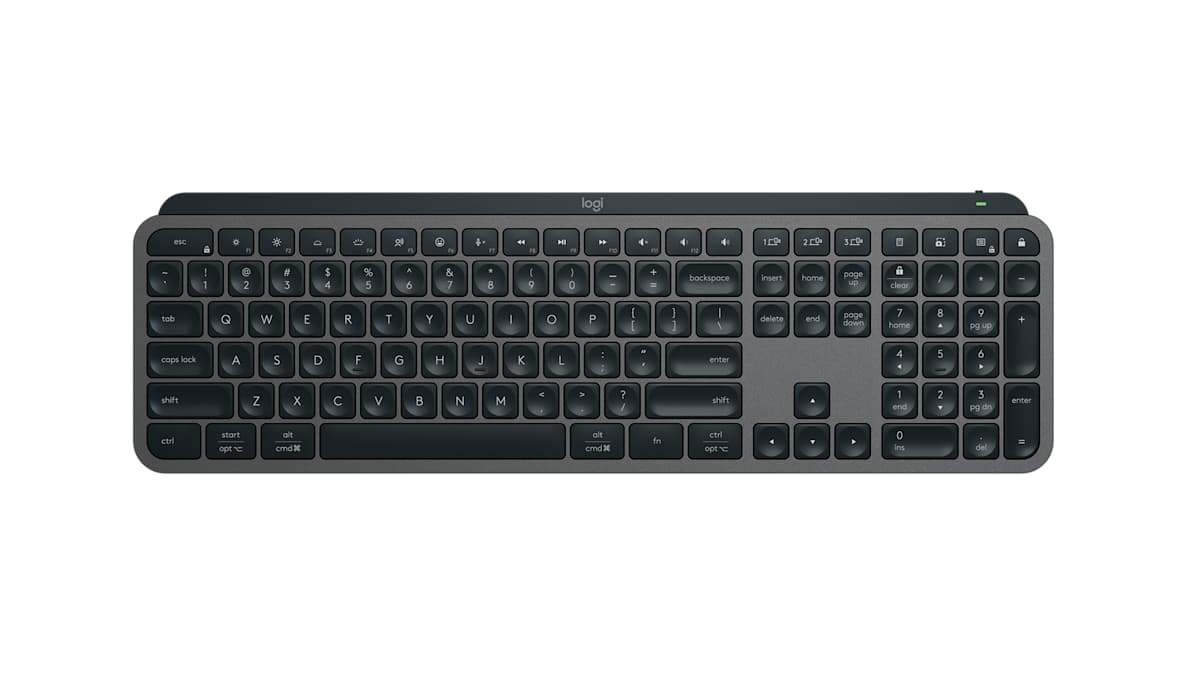
Logitech gives the MX Keys S as 16.94 inches wide by 5.18 inches deep, 0.81 inches thick, at 810 grams. The top-view image shows a full number pad on the right, which is where most of that width goes, and a row of function keys along the top that double as shortcuts: brightness, backlight level, dictation, the emoji menu, mic mute, media, volume, the three Easy-Switch channels, a calculator and screen capture. The keys are described as spherically dished so the fingertip settles into the center, and Logitech claims increased key stability, which it credits for less noise.
Each key carries both a Mac and a Windows legend, so the same board can move between a MacBook and a PC without the Command and Alt keys ending up in the wrong place. The list of supported systems is long: Windows 10 and 11, macOS 10.15 and later, Linux, ChromeOS, iPadOS 14 and later, and Android 8 and later. The catch is that only Windows and macOS get Logi Options+, and without it the function row does what Logitech decided, not what you decide.
Sensors that decide when the backlight is worth its power
The S in the name is mostly about two sensors. A hand-proximity sensor turns the backlight on when your hands approach, and an ambient light sensor scales its brightness to the room, with the duration and level adjustable in Logi Options+. Logitech's pitch is that the backlight is bright when it helps and off when it does not, and the battery rating is written around that: up to 10 days per charge with backlighting active, and up to 5 months with it turned off. Both figures carry the usual note that results vary with use.
The cell is a 1500 mAh lithium polymer pack, recharged through a USB Type-C jack on the back edge; the lead in the box has a USB-A plug on the far end, so a laptop with only Type-C sockets will need a C-to-C cable of its own. A Caps Lock light and a battery light are the only indicators. The working reading of the numbers is that a person who leaves the backlight on will charge the keyboard every week or two, and a person who turns it off will forget the cable exists.
Bluetooth, Bolt, and the receiver that will not mix
The keyboard connects over Bluetooth Low Energy or over the Bolt dongle that ships with it, and Easy-Switch stores three devices so one key press moves typing from a laptop to a desktop to a tablet. Range is quoted at 33 feet. Logitech is explicit that the keyboard does not work with its other USB receivers, which matters on a desk that still runs an older Unifying mouse: Bolt and Unifying are separate systems, and the older mouse keeps its own dongle or moves to Bluetooth. Logitech Flow, which lets an MX mouse drag the cursor and the keyboard across two computers, is supported when paired with a Flow-capable mouse.
For a compact alternative, Logitech's own Pebble Keys 2 K380s is 10.98 inches wide, runs on two AAA cells for a rated 36 months, pairs three devices over Bluetooth, and is listed at $33.99 against a $39.99 sticker figure. It has no backlight and no number pad, and the Bolt receiver is not included, so the K380s is the right answer for a laptop that travels and the MX Keys S is the right answer for a desk with a monitor on it.
One year of coverage, 30 days to return, 26% recycled plastic
Logitech covers the MX Keys S hardware for one year, and orders placed on logitech.com can be returned for 30 days. The package holds the keyboard, the Bolt receiver, the USB-A to Type-C charging lead and the paperwork. Refurbished units, when Logitech offers them, come with a 90-day warranty and the same 30 days to return, which is a fair fallback if the price on a new one climbs back to $129.99.
On materials, Logitech reports that the Graphite keyboard is 26% certified post-consumer recycled plastic, excluding packaging and the circuit board, that the key module bracket is low-carbon aluminum, and that the packaging paper is FSC certified. The site notes the recycled share may differ by color. None of that changes how the keyboard types, but it is more disclosure than most keyboard makers publish, and it is on the same page as the price.
Skip it if your desk has one machine and a window
The MX Keys S charges for three things: the backlight sensors, the three-device switching, and the Options+ automation. A person who types on one laptop under daylight uses not one of them, and a $33.99 Pebble Keys or a wired board would leave $86 on the table for a mouse or a monitor arm. The same goes for an owner of the original MX Keys, since the switches and the battery are unchanged and the new sensors are a convenience, not a repair.
Walk away as well if you want any tactile feedback beyond a laptop-style scissor key, if 17 inches of keyboard will not fit between your monitor and the edge of the desk, or if your setup runs Linux and you were counting on remapping. The board is at its best on a shared desk with a Mac and a PC, an MX mouse already talking to Logi Options+, and a lamp that goes off before the work does.
How we put this together
Built from the product pages and listings below, without test scores or results we have not measured. Specifications and prices change, so check the original page for the exact model, current price, delivery, and returns.
- Logitech: MX Keys S product page (opens in a new tab)
- Logitech: Order FAQs (opens in a new tab)
- Logitech: Pebble Keys 2 K380s product page (opens in a new tab)