Product image supplied by the brand
In this guide
Plenty of laptops negotiate one external display and stop there. By Plugable's own count, the base M1 and M2 Macs drive a single screen on their own, and a base M3 reaches two only with the lid closed. The Plugable UD-6950PDZ advertises three extended displays at 4K 60Hz from one USB-C cable, and it reaches that number by adding two DisplayLink screens to the one the host drives over DisplayPort Alternate Mode, which is how the claim survives on hardware that would otherwise refuse.
The mechanism sets the limits. DisplayLink emulates graphics hardware, and Plugable's guidance restricts this class of dock to office work and light web browsing, not games or full-screen video. The price is $229.99 at plugable.com and at the brand's Amazon listing on September 30, and the comparison that settles the choice sits one shelf over: the Thunderbolt 4 TBT4-UD5 costs $199.95, installs no driver, and cannot drive three displays.
Our verdict
Buy it when the third display matters and the graphics you already have stop at one or two. DisplayLink supplies the extra screens, and Plugable's own exclusion list rules out games, video editing and full-screen playback.
- A good fit for
- Someone with a laptop whose own video outputs stop at one or two screens, especially a base M1, M2 or M3 Mac, who needs three extended 4K displays and does office work on them.
- We would skip it if
- You play games or edit video on those screens, you want a driverless dock, or two displays on a Windows Thunderbolt 4 or USB4 laptop are enough — Plugable's Thunderbolt 4 dock costs $30 less and drives two there without software.
Reasons to consider it
- Three extended 4K 60Hz displays from one USB-C cable, using any three of the six video outputs: three HDMI 1.4 and three DisplayPort 1.2
- Plugable states that base M1, M2 and M3 Macs run three displays here through DisplayLink even where the computer supports only one display output on its own
- 100W of laptop charging from the included 135W adapter, plus six USB-A ports at 5Gbps, Gigabit Ethernet and a 3.5mm headset jack
The compromises
- Plugable's own guidance puts 2D and 3D graphics applications, full-screen video playback, video editing software and games outside what this dock is recommended for
- macOS needs the DisplayLink Manager application installed by hand with administrator rights and a one-time Screen Recording permission, and the driver has to be running for video to work
- Display 1 runs at 4K 30Hz when the host's USB-C port carries DisplayPort 1.2 instead of 1.4, which is easy to miss on an older laptop
What we have not verified: Nothing Plugable publishes covers how much CPU a three-screen DisplayLink session costs, how warm the housing gets, or how the picture holds up with particular monitors. Plugable publishes no power draw for the dock with three displays attached, and its requirements block lists macOS 11, 12 and 13 while a compatibility bullet on the same page reads macOS 11 and later. Whether a user's own USB-C cable carries enough bandwidth for DP 1.4 is also unverified, since the maker only says to use the included cable or another that passes video, data and charging.
The things in this guide
A closer look at the products, who they may suit, and what to check before buying.
UD-6950PDZ Triple Monitor Docking Station
DisplayLink adds two 4K displays to the one the host drives over Alt Mode, so three screens run from one cable on laptops whose own graphics stop at one or two, and the same cable carries 100W of laptop charging.
Before you buy: Games, full-screen video and video editing are outside what Plugable recommends DisplayLink for, macOS needs a manual driver install with Screen Recording permission, and the driverless Thunderbolt dock one shelf over costs $30.04 less.
Price checked September 30, 2026. Retailer prices can change.Three displays on a host that only drives one
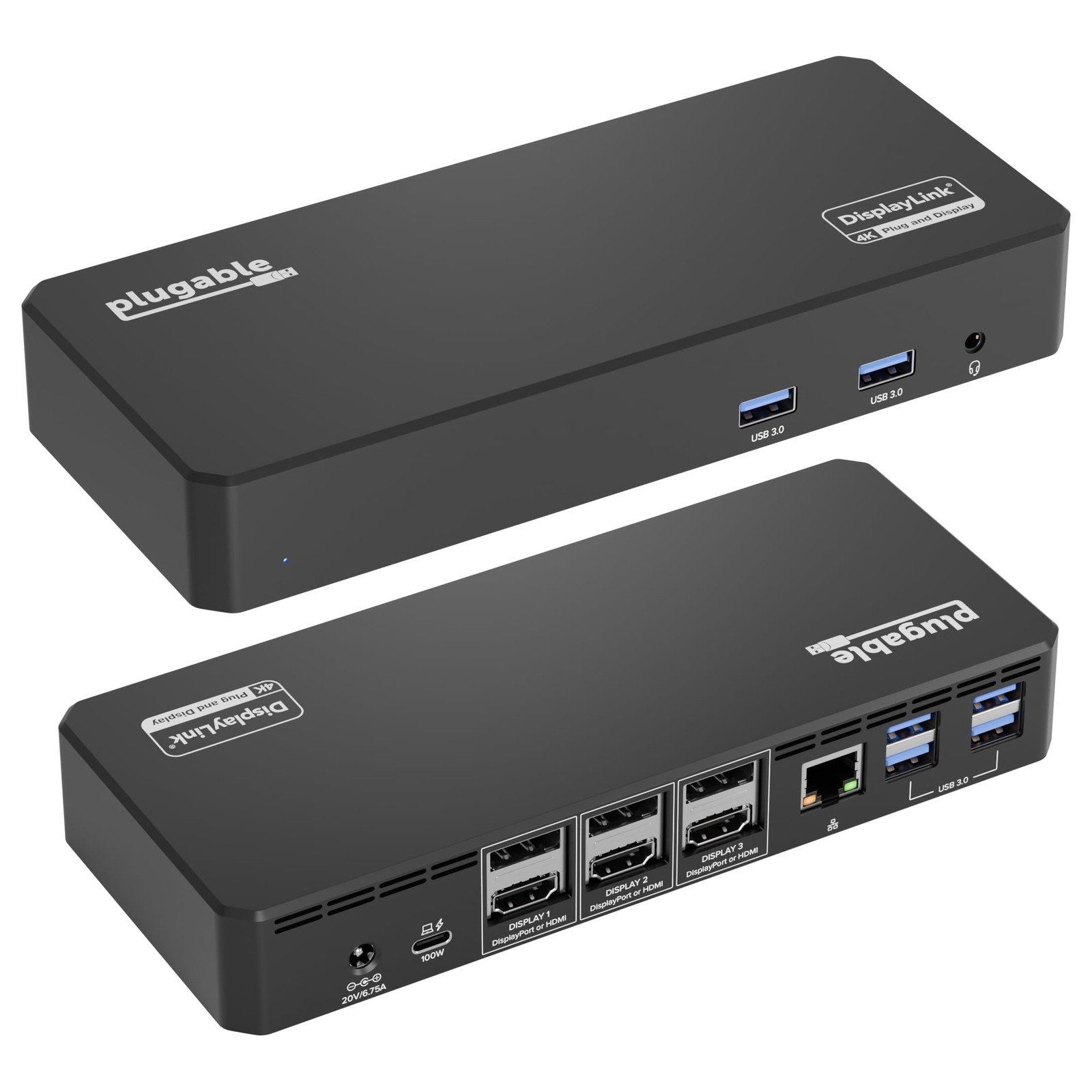
Six video outputs sit across the back: three HDMI 1.4 and three DisplayPort 1.2, and any three of them work at once. Plugable rates the dock for three 4K 60Hz displays on USB4, Thunderbolt 4 and USB-C hosts, with a condition that decides many setups: the host's USB-C port has to carry DisplayPort Alternate Mode 1.4, and the FAQ notes that a host on DP 1.2 leaves Display 1 at 4K 30Hz while DP 1.4 carries it to 60Hz. Plugable's own figures disagree at the edge, since the marketing block promises three 4K 60Hz displays on USB-C, USB4 and Thunderbolt systems while the sibling chart lower on the page caps that at USB4 or Thunderbolt 4.
The three-screen claim is the reason this dock exists, and the port table shows how it is built. One HDMI and one DisplayPort output are wired to the host's DisplayPort Alternate Mode, so Display 1 is drawn by the laptop's own graphics; the other four outputs hang off the dock's DL-6950 DisplayLink chip, which the driver feeds over USB. Plugable states the consequence plainly: base M1, M2 and M3 Macs connect three displays here even where the computer supports only one display output on its own. When three displays will not light, the FAQ's first check is whether the laptop's USB-C port carries video at all.
The driver is part of the purchase
DisplayLink software is required for full functionality, and how it arrives depends on the platform. On Windows the installation is typically automatic, and Plugable notes that IT departments can stage or deploy the driver across a fleet. On macOS the DisplayLink Manager application is a manual install that needs administrator rights, plus a second step: the Screen Recording permission, granted once, which lets the driver send display data over USB to the dock. Plugable states that the permission records and stores nothing, and that DisplayLink Manager has to be running for the video outputs to work at all.
The requirement list names Windows 11 and 10, macOS 11, 12 and 13, and an Intel Core i5 from the sixth generation at 2.4GHz or faster, or an AMD Ryzen 5 or better. Administrator rights are on the list, which matters on a managed work laptop, and the macOS entry stops at version 13, while a compatibility bullet higher on the same page reads macOS 11 and later, so a Mac on a newer release rests on the looser of the two lines. After setup, the arrangement holds as long as the application keeps running.
What the DisplayLink route will not do
Plugable writes the limitation into the page without hedging. DisplayLink works by emulating graphics hardware, which Plugable calls great for office and light web-browsing applications; 2D and 3D graphics applications, full-screen video playback, video editing software and games may not work as expected and are not recommended for use with this docking station. A separate answer adds that video production workflows are not a recommended use either.
That boundary decides which monitor gets which job. Plugable's guidance is to keep documents, email and other static content on the DisplayLink screens and to reserve games or CAD work for a display connected to the machine's native graphics output, a list in which Plugable includes USB-C DisplayPort Alternate Mode. On this dock that is Display 1, so a three-screen buyer who also plays games or edits footage has one screen for that work, or a monitor plugged into the laptop itself, while Displays 2 and 3 stay document screens.
One cable, 100W, and the ports around it
The same cable carries power back to the laptop. The host USB-C port delivers 100W at 20V and 5A over USB Power Delivery 3.0, which Plugable says can stand in for an original charger rated 100W or less, and the included adapter is a 135W unit rated 20V 6.75A. Around the video and power, the dock adds six USB-A ports at 5Gbps, two at the front and four at the back, each rated 5V 900mA, a Gigabit Ethernet socket and a 3.5mm TRRS headset jack.
The housing measures 1.2 by 7.9 by 3.3 inches (3.1 by 20 by 8.5 cm) and weighs 477 g (16.8 oz). In the box: the dock, a 0.84 m (2.76 ft) host lead rated at USB 3.0 5Gbps, the power adapter, an IEC C5/C6 cord of the same length and a quick start guide. The 5Gbps figure covers the host link and every USB-A port, so an external drive runs at USB 3.0 speed and no faster.
Where it sits in Plugable's own line
The two-screen rungs show what the step up buys. The UD-3900 costs $99.95 and drives two displays from six USB ports at up to 1920x1200 at 60Hz, and the UD-6950Z costs $159.99 for two 4K 60Hz screens and the same six ports. Neither charges the laptop, and this dock does at 100W, so the third screen and the power supply arrive in the same move.
The driverless option in the line is a Windows one. The UD-MSTH3 costs $149.99 and uses MST over three HDMI ports for dual 4K 60Hz or a triple arrangement of one 4K 60Hz plus two 1080p 60Hz screens, with 2.5G Ethernet and 100W charging, and Plugable marks it as not recommended for Mac or ARM hosts. The UD-ULTC4K costs $245.99 and covers three 4K 60Hz displays, five USB ports and 100W certified to 96W, which is $16 more than the UD-6950PDZ for one fewer USB port and the same three-screen reach.
The Thunderbolt 4 dock on the same shelf is the harder comparison. The TBT4-UD5 lists at $199.95 at the maker's store and on Amazon, $30.04 less, with 13 ports, 40Gbps of bandwidth, a downstream Thunderbolt 4 port, SD and microSD slots, Gigabit Ethernet, charging certified to 96W and no driver at all. What it gives up is display count: dual 4K 60Hz over HDMI on Windows Thunderbolt 4 and USB4 systems, one external display on base M1 and M2 Macs, and two on a base M3 only with the lid closed. Plugable adds that it is an active dock that has to stay connected to power, and that the HDMI outputs stop at 60Hz.
Price, coverage, and the skip conditions
Both channels listed $229.99 on September 30: Plugable's US store with the product in stock, and the brand's Amazon listing, where Plugable Technologies is the seller and Amazon ships the dock and takes it back for a month at no charge. The channels differ after the sale. A problem with an order from Plugable's own store has to reach support inside a month of the parcel arriving; the dock then travels back boxed as it came, accessories included, on a prepaid label once support approves it, and any shipping fee paid stays with Plugable. The warranty is the same either way: two years against defective parts or workmanship, with lifetime support from the North American team.
The purchase turns on the third display. Three extended 4K screens from one cable on a laptop that drives one on its own is the job no driverless dock in this line will do, and it is what the $229.99 pays for. Where three displays without a software install matter, the UD-MSTH3 on Windows at $149.99 is the one; where two suffice, the driverless TBT4-UD5 at $199.95 is cheaper. Anyone whose work is games, full-screen video or editing should not buy this dock, because Plugable says it is not recommended for those workloads.
How we put this together
Built from the product pages and listings below, without test scores or results we have not measured. Specifications and prices change, so check the original page for the exact model, current price, delivery, and returns.
- Plugable: UD-6950PDZ product page (opens in a new tab)
- Plugable: TBT4-UD5 Thunderbolt 4 docking station product page (opens in a new tab)
- Plugable: UD-MSTH3 USB-C triple monitor docking station product page (opens in a new tab)
- Plugable: Warranty policy (opens in a new tab)
- Plugable: Refund, return and billing policy (opens in a new tab)
- Amazon: Plugable UD-6950PDZ listing (opens in a new tab)
- Amazon: Plugable TBT4-UD5 listing (opens in a new tab)
- Plugable: UD-3900 product page (opens in a new tab)
- Plugable: UD-6950Z product page (opens in a new tab)
- Plugable: UD-ULTC4K product page (opens in a new tab)