Product image supplied by the brand
In this guide
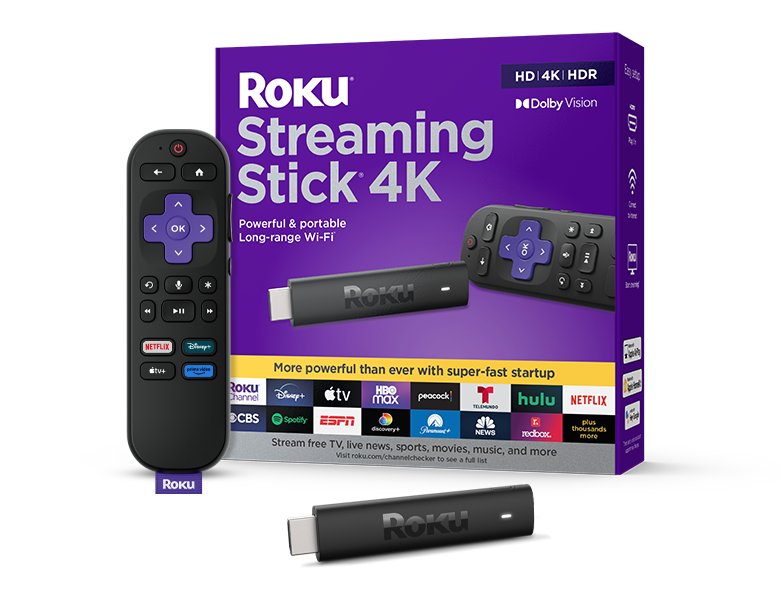
Roku's player lineup on its US store runs Streaming Stick at $39.99, Streaming Stick Plus at $59.99, and Streaming Stick 4K at $79.99, with the Ultra and Streambar SE above them. The 4K stick is catalogued as model 3820R2, measures 3.7 by 0.80 by 0.45 inches, weighs 0.90 ounces, and is the only one of the three sticks whose output table lists Dolby Vision. It also carries a different wireless spec, 802.11ac dual-band MIMO, and a different power arrangement: a USB cable with a long-range Wi-Fi receiver built into it, fed by a wall adapter that Roku packs in the box.
This review is assembled from Roku's product page, its player comparison, and the published device warranty, with no hands-on testing. Read that way, the $20 gap between the Plus and the 4K comes down to two hardware differences, Dolby Vision output and the receiver cable, and one packaging difference, the wall adapter. Each section below takes one of those and asks whether it matters for your TV, then the closing section lists the situations where the cheaper stick or a different class of device is the better call.
Our verdict
Worth the $79.99 only when the TV it feeds supports Dolby Vision or sits far enough from the router that the long-range receiver matters. On any other TV the $59.99 Streaming Stick Plus lists the same 4K60 output with fewer parts to plug in.
- A good fit for
- Owners of a Dolby Vision TV whose HDMI input supports HDCP 2.2, especially in a room where a plain stick powered from the TV's USB port would struggle to hold a 5 GHz connection.
- We would skip it if
- Your TV handles HDR10 but not Dolby Vision, you want the stick powered from the TV's own USB port with no wall adapter, or you need an Ethernet jack or Wi-Fi 6, none of which Roku lists for this model.
Reasons to consider it
- Roku publishes a full output table: 2160p at 60 fps with Dolby Vision, HDR10/10+, and HLG, plus up-scaling from 720p and 1080p sources
- The Wi-Fi spec is stated as 802.11ac dual-band MIMO on 2.4 GHz and 5 GHz, and the long-range receiver is built into the USB power cable, so it sits away from the TV chassis
- The voice remote carries TV power, volume, and mute buttons, and the box includes two AAA batteries, the receiver cable, and a power adapter, so nothing extra is needed on day one
The compromises
- Power input is 5 V at 1 A through the receiver cable, and Roku ships a wall adapter in the box, which signals this stick is not meant to run from a TV's USB port the way the Streaming Stick Plus is
- 802.11ac is Wi-Fi 5, and the port list is HDMI 2.0b plus USB for power only, so there is no wired network option at all
- Dolby audio is listed as pass-through over HDMI, not decoding, and Roku's fine print says Dolby Atmos depends on compatible content and a compatible sound system
What we have not verified: Roku does not publish typical power draw for this model (the Plus page states about 2.5 W), nor the processor, RAM, or storage. Roku's page for this stick never mentions Bluetooth headphone mode, which the Plus page advertises, so we cannot say whether the 4K stick has it. We have verified the $79.99 price only on roku.com, and the warranty text we read is the general Roku device warranty, not a document specific to model 3820R2.
The things in this guide
A closer look at the products, who they may suit, and what to check before buying.
Streaming Stick 4K · 3820R2
At $79.99 it is the only Roku stick whose output table includes Dolby Vision alongside HDR10/10+ and HLG at 2160p60, and its 802.11ac MIMO radio plus the receiver built into the power cable are the parts that address a weak 5 GHz signal behind a wall-mounted TV.
Before you buy: The same page shows the $59.99 Streaming Stick Plus reaching 2160p60 with HDR10/10+ and HLG, powered from USB-C with no adapter in the box. If your TV lacks Dolby Vision, the extra $20 buys a radio spec and a wall plug you may never notice.
Price checked September 11, 2026. Retailer prices can change.The output table, and what Dolby Vision adds to the bill
Roku lists three TV classes for this stick. On an HD TV it outputs up to 1080p with up-scaling from 720p. On a 4K TV it reaches 2160p at 60 fps with up-scaling from 720p and 1080p sources. On a 4K HDR TV it supports Dolby Vision, HDR10, HDR10+, and HLG, all up to 60 fps, with the footnote that the TV needs an HDMI input supporting HDCP 2.2 and a High Speed HDMI cable. The fine print adds that 4K and HDR content may be limited, may cost extra, and that Roku recommends 25 Mbps of bandwidth for 4K.
Set that against the Streaming Stick Plus page and the difference narrows to one line: the Plus lists HDR10/10+ and HLG but not Dolby Vision, at the same 2160p60 ceiling. Both sticks share HDMI 2.0b-class output, the same 3.7 by 0.80 by 0.45 inch shell, and the same 0.90 ounce weight. So the $20 premium is, on the video side, a Dolby Vision license and whatever silicon supports it. On a TV that only decodes HDR10 the two sticks should produce the same signal, and Roku's own comparison chart does not claim otherwise.
802.11ac MIMO, a receiver in the cable, and a wall adapter you must use
The networking line reads 802.11ac dual-band MIMO Wi-Fi on 2.4 GHz and 5 GHz, and the port list is HDMI 2.0b plus USB for power and the long-range Wi-Fi receiver. Two consequences follow. First, 802.11ac is Wi-Fi 5, so a Wi-Fi 6 or 6E router will fall back to the older standard for this device. Second, there is no Ethernet jack and Roku lists no wired adapter for the stick, so a room with poor wireless coverage has no fallback beyond moving the router or adding an access point.
The receiver cable is Roku's answer to the coverage problem. Instead of an antenna trapped behind a metal TV chassis, the radio front end sits in the USB lead, which can dangle where the signal is better. The cost of that design shows up in the box: a power adapter and a 5 V 1 A input. The Plus page, by contrast, advertises no power brick, USB-C power, and roughly 2.5 W typical draw while streaming 4K, which is the profile of a stick fed from a TV's USB port. Roku publishes no typical draw for the 4K model, so we cannot say whether a TV port would sustain it, only that Roku ships an adapter and expects you to use it.
Voice remote, HDMI audio, and the four smart-home logos
The remote is the Roku Voice Remote with TV power, volume, and mute buttons, and Roku notes those TV controls work with most TVs, which is a hedge worth reading literally: HDMI-CEC and IR behavior vary by set, and Roku does not publish a compatibility list. Two AAA batteries come pre-installed. Voice search across apps is the headline feature; the page does not describe hands-free operation, a headphone jack on the remote, or a rechargeable cell, and the box list confirms no one of those.
Audio is digital stereo over HDMI, with DTS Digital Surround pass-through and pass-through of Dolby-encoded audio. Pass-through means the stick hands the bitstream to the TV or receiver to decode, so an Atmos track only helps if the downstream gear handles it, which Roku's disclaimer says outright. Compatibility badges cover Roku Smart Home, Apple AirPlay and HomeKit, Google Home, and Alexa, each of which needs its own compatible device or app; the stick is a target for those systems, not a hub for them.
$39.99, $59.99, $79.99: where the 4K stick sits
Roku's players page prices the HD Streaming Stick at $39.99, the Streaming Stick Plus at $59.99, and the Streaming Stick 4K at $79.99. The comparison block on the 4K page summarizes them as HD, 4K with HDR, and 4K with HDR and Dolby Vision, all with the same voice remote. The Plus page also lists Bluetooth Headphone Mode and USB-C power, two things the 4K page never mentions. That leaves the 4K stick with a strange position: it is the most expensive stick, has the best video spec, and is the only one that needs a wall outlet.
For a bedroom TV mounted high on a wall with the router two rooms away, that trade favors the 4K stick, because the receiver cable and MIMO radio are the only tools Roku offers against a weak signal short of buying an Ultra with Ethernet. For a living-room TV within sight of the router, the Plus reaches the same 2160p60 with HDR10/10+ for $20 less and no adapter. Roku sells all three with free ground shipping in the US and a 30-day refund promise on purchases from roku.com, though the buyer pays return shipping.
One year of hardware coverage, thirty days to change your mind
Roku's published device warranty covers durable hardware components of streaming players and their included remotes for material and workmanship defects during the year that follows the purchase, for the end user who bought the device from Roku or an authorized US reseller. The remedy is repair or replacement with a new or rebuilt unit at Roku's option. Service requires a Return Merchandise Authorization from Roku's support site, valid for thirty days, and the device must ship back freight prepaid with the purchase receipt and all accessories in the original or equivalent packaging.
Consumables are excluded, and the text names batteries and adhesive strips specifically, so the two AAA cells in the remote are not covered. Signal reception problems and issues caused by a streaming service are also outside scope, which matters for a device whose main selling point is a stronger wireless link: a weak connection is not a warranty claim. Separately from the warranty, purchases from roku.com carry a 30-day refund promise from the ship date, with the purchaser paying return postage. That window is the practical way to learn whether the receiver cable actually fixes a coverage problem in your house.
When to skip the Streaming Stick 4K
Skip it if your TV does not support Dolby Vision, because the Plus lists the same 2160p60 output with HDR10/10+ and HLG for $59.99 and powers over USB-C without an adapter. Skip it when the stick has to be fed from the TV's USB port, since Roku ships a wall adapter with this model and publishes no typical draw that would let you judge whether a TV port is enough. Skip it when Ethernet or Wi-Fi 6 is required; the port list is HDMI and USB for power, and the radio is 802.11ac.
Skip it also if you want a remote with a headphone jack or a rechargeable battery, neither of which appears in the box list, or if Bluetooth headphone listening matters, because that feature is advertised on the Plus page and absent from this one. Roku's Ultra exists for buyers who need wired networking and more ports. The 4K stick is the right pick for a narrow case, a Dolby Vision TV with a marginal wireless link, and for that case the receiver cable is the reason to pay the extra $20.
How we put this together
Built from the product pages and listings below, without test scores or results we have not measured. Specifications and prices change, so check the original page for the exact model, current price, delivery, and returns.
- Roku: Streaming Stick 4K product page (opens in a new tab)
- Roku: Streaming Stick Plus product page (opens in a new tab)
- Roku: Limited Warranty for Roku brand devices (US) (opens in a new tab)
- Roku: Players category page (opens in a new tab)