Product image supplied by the brand
In this guide
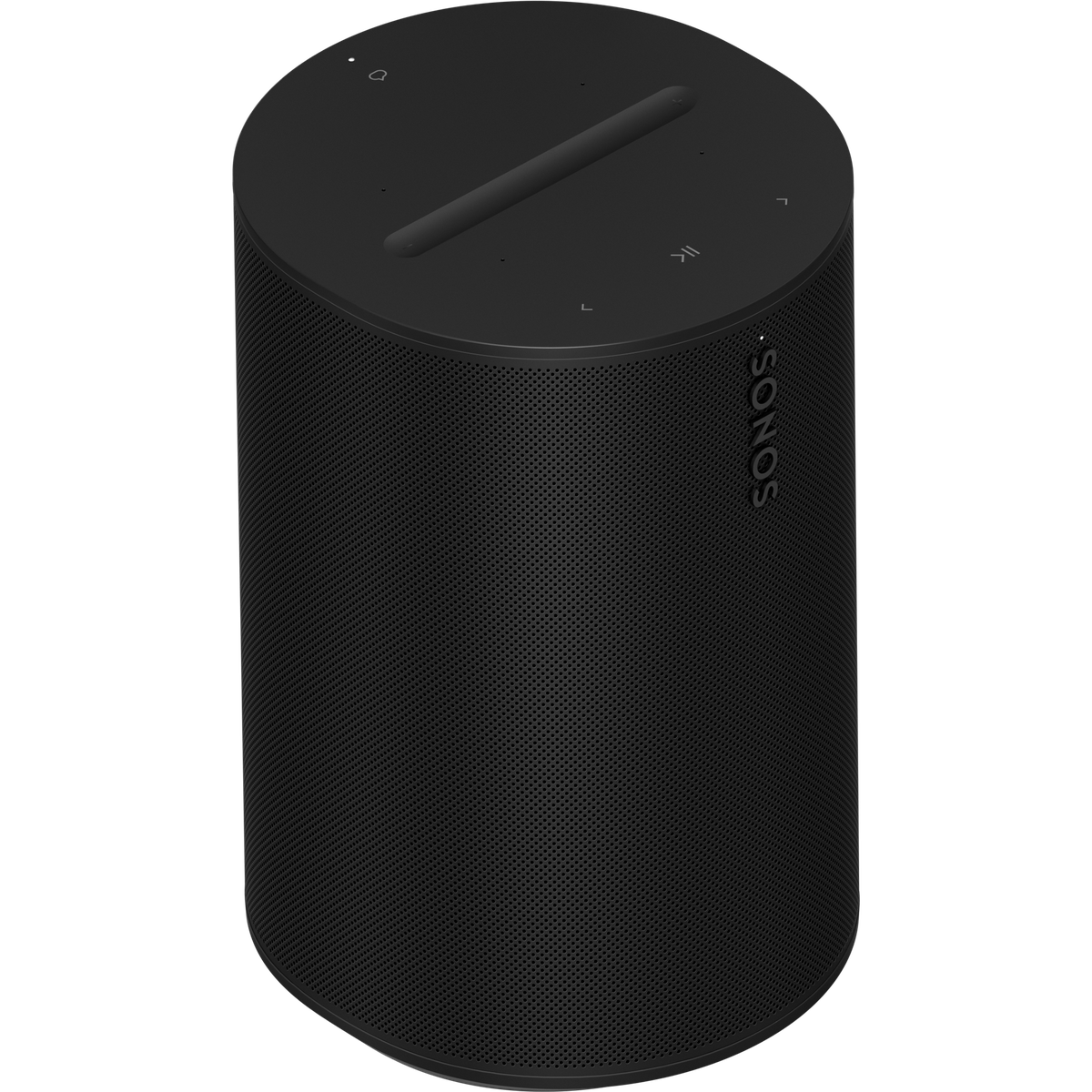
Sonos sells the Era 100 for $219 in black or white, with shipping paid on US orders and a 30-day send-back offer at Sonos's own shop, and both colors read InStock on October 10, 2026. Inside a 182.5 x 120 x 130.5 mm cabinet sit three Class-D amplifiers driving two angled tweeters and one midwoofer. Three amplifiers and three drivers are more hardware than a single-driver portable carries, and the $219 is a starting point for a system that a second speaker, a Sub, or a soundbar can join later without replacing the first one.
The conditions attach before any note plays. The Era 100 must be set up through the Sonos app on Wi-Fi before Bluetooth will work at all, and Sonos requires an account the first time a system is created. Wired input needs the $19 Line-In Adapter, Ethernet needs the $39 Combo Adapter, and S1-era Sonos speakers cannot be grouped with it. Buy it when one fixed room and a possible second speaker are the plan; a phone-and-Bluetooth-only listener is paying for an account and an app to get sound.
Our verdict
Buy the $219 Era 100 for one room that may gain a second speaker or soundbar later. Skip it when Bluetooth from a phone is the only source: setup needs the app, an account, and Wi-Fi first.
- A good fit for
- A kitchen, study, or bedroom that stays put, where you want app control, AirPlay 2, and the option of adding a second speaker or a soundbar later.
- We would skip it if
- A room fed only by Bluetooth from a phone, an S1-era Sonos system you want to keep grouping, or a household that will not create and keep a Sonos account.
Reasons to consider it
- Three Class-D amplifiers drive two angled tweeters and one midwoofer in a 182.5 x 120 x 130.5 mm cabinet, and two units can be bonded as a stereo pair.
- Wi-Fi 6, Bluetooth 5.3, and AirPlay 2 in the same box, with a USB-C port that accepts the $19 Line-In Adapter or the $39 Combo Adapter for Ethernet.
- One-year warranty, a 6 ft power cable included, and no subscription tied to the speaker.
The compromises
- No sound without the Sonos app and an account, and no Bluetooth until the speaker has been set up on Wi-Fi.
- Wired input is a $19 extra, Ethernet is $39, and both line-in and Bluetooth are disabled when the speaker is used as a surround.
- It requires the latest Sonos app and cannot be grouped with S1-only products, so an older Sonos system ends up with two apps and two separate room groups.
What we have not verified: Sonos publishes no amplifier wattage and no Bluetooth codec list for the Era 100, so loudness and aptX or LDAC support remain unknown, and its two documents give 2.02 kg and 2.2 kg for the same speaker. A published lab measurement would change how the $180 step to the Era 300 reads, and the $219 and $399 prices are single-day snapshots.
The things in this guide
A closer look at the products, who they may suit, and what to check before buying.
Sonos Era 100
$219 at Sonos on 2026-10-10 with both colors in stock, free US shipping, and a 30-day send-back policy: three Class-D amplifiers, two angled tweeters and one midwoofer, Wi-Fi 6, AirPlay 2, Bluetooth 5.3, plus a USB-C port that takes the $19 Line-In Adapter or the $39 Combo Adapter.
Before you buy: Requires the latest Sonos app, an account, and Wi-Fi before it plays; no battery; wired input costs extra; line-in and Bluetooth are off when it serves as a surround.
Price checked October 10, 2026. Retailer prices can change.What three amplifiers and a two-kilogram cabinet buy
Sonos lists three Class-D amplifiers, two angled tweeters, and one midwoofer, and publishes no wattage for any of them, so there is no figure here to set against a 20 W portable. The cabinet measures 182.5 x 120 x 130.5 mm. Weight is where the documents part: the product page gives 4.45 lb (2.02 kg) and the product guide says 4.85 lb (2.2 kg). A shelf will not care, but a wall bracket rated to a specific load is the case where the difference has to be settled before drilling.
The wireless side is current rather than unusual: Wi-Fi 6 on 2.4 and 5 GHz, Bluetooth 5.3 for streaming straight from a phone, and AirPlay 2 for Apple devices on iOS 11.4 or later. Sonos does not document which Bluetooth codecs the Era 100 accepts, so there is no verified claim to make about aptX or LDAC. The single USB-C port is for the adapter accessories, not for powering the speaker or charging a phone, and a buyer with no turntable or CD player can ignore it without losing anything.
The $180 step to an Era 300
Sonos charges $399 for the Era 300, and the $180 pays for hardware rather than a badge: six Class-D amplifiers, four tweeters, and two woofers against the Era 100's three, two, and one, plus Dolby Atmos support. The body grows to 260 mm wide and 4.42 kg, against 120 mm and roughly 2 kg here. Both speakers run the latest Sonos app, both take the same Line-In and Combo Adapters, and both can be stereo paired or used as home theater surrounds.
Two Era 100s cost $438, which is $39 more than a single Era 300, and that is the sharper comparison for a desk or a kitchen: a stereo pair against one Atmos speaker. Spatial audio only repays the extra when the room and the source material support it; a streaming playlist on a countertop does not. Buy the Era 300 when the wide cabinet and Atmos are the point of the room, and the Era 100 when a second unit for stereo is the likelier next purchase.
An account and an app come before the first note
A new Sonos system starts with an account. Sonos states that setting up a system for the first time requires creating one, verified by email, and that an iOS or Android device is required to set up a new system or add a product. The Sonos app runs on iOS 18, iPadOS 18, Android 10, or Fire OS 7 and later. A laptop alone cannot complete the first setup.
The network list is narrower than the wireless spec suggests. Sonos does not support guest networks, satellite or LTE routers, wireless range extenders, 5 GHz-only routers, Ethernet-over-power adapters, or VPNs that block local network access, and a system tops out at 32 products. Disabling Wi-Fi to run the Era 100 wired is possible only while it has an Ethernet connection, which means the $39 Combo Adapter plus a cable. A wired-only plan should count both in the entry price before ordering.
Where an older Sonos system stops
Era 100 requires the latest Sonos app and is not compatible with the S1 Controller app. Sonos's compatibility list puts the Bridge, Connect (Gen 1), Connect:Amp (Gen 1), Play:5 (Gen 1), and the ZonePlayer models in the S1-only column, while products such as the One (Gen 2) and Play:5 (Gen 2) can run on either.
Running both means two systems and two apps. Sonos documents that rooms in the two systems cannot be grouped for the same audio, and that the same voice service on both needs separate accounts, which Sonos does not recommend because both systems may answer at once. An S1-era owner who wants the old speakers in the same group as an Era 100 is looking at a replacement, not an addition.
The $19 wired input, and the voice choices
The Era 100 has a single USB-C port and no analog jack. A turntable or CD player needs the $19 Sonos Line-In Adapter, or the $39 Combo Adapter, which does the same and adds Ethernet; a turntable without a built-in phono preamp needs one in the chain. Line-in is disabled while the speaker is used as a surround, and its settings cover source level, an audio delay for grouped playback, and autoplay, which ships off.
Voice is a choice between services rather than one built-in. Sonos Voice Control works in US English and French, and Amazon Alexa can be added alongside it; Sonos says Google Assistant and Sonos Voice Control cannot both be active on one speaker, though Google Assistant can run on another speaker in the same system. Siri arrives through the Apple Home app and is limited to Apple Music. AirPlay and Bluetooth are both disabled when the Era 100 serves as a surround, and Bluetooth audio can be shared to grouped rooms after Wi-Fi setup.
What the order costs beyond $219
The carton contains the speaker, a 6 ft (2 m) power cable, and the quickstart guide. Wired input adds $19, Ethernet brings the adapter to $39, and a second Era 100 for stereo is another $219, with Sonos recommending 8 to 10 feet between the pair and 8 to 12 feet to the listening position. Sonos also sells the Era 100 SL, the same acoustic hardware without microphones or voice control, for buyers who want neither.
Warranty coverage is one year for defects in materials and workmanship, counted from shipment or the original retail purchase at an authorized dealer. Direct purchases can be returned within 30 days, with Sonos paying the postage back and asking for the speaker in the packaging it arrived in; that 30-day period shows up both in the Terms of Sale and in the page's machine-readable product data, while a 45-day returns line survives elsewhere in Sonos's site copy. No subscription attaches to the speaker, and streaming services remain separate.
When to leave the $219 in the account
Skip it if the room will only ever be fed by Bluetooth from a phone. The Era 100 must be set up on Wi-Fi through the app first, so a Bluetooth-only plan buys an account, an app on the phone, and a network setup for a job a portable does without them. Rule it out when an S1-era Sonos system has to keep playing in the same group, or if nobody in the house wants to create and maintain a Sonos account.
A fixed speaker with a streaming app, a turntable, or an occasional AirPlay session is the job the $219 covers, and the $19 adapter closes the analog gap. Buy it when a second speaker for stereo is a real possibility and the room is not going anywhere; the Atmos cabinet and the wider soundstage belong to a different $399 purchase.
How we put this together
Built from the product pages and listings below, without test scores or results we have not measured. Specifications and prices change, so check the original page for the exact model, current price, delivery, and returns.
- Sonos: Era 100 product page (opens in a new tab)
- Sonos: Era 100 product guide (opens in a new tab)
- Sonos: Line-In Adapter product page (opens in a new tab)
- Sonos: Combo Adapter product page (opens in a new tab)
- Sonos: Terms of Sale (US) (opens in a new tab)
- Sonos Support: Sonos app version compatibility (opens in a new tab)
- Sonos Support: Known limitations with separate S1 and S2 Sonos systems (opens in a new tab)
- Sonos Support: Creating your Sonos account (opens in a new tab)
- Sonos Support: Set up your Sonos Era 100 (opens in a new tab)
- Sonos Support: Pair Sonos Era 100 with Bluetooth (opens in a new tab)
- Sonos Support: Play Line-In on your Era 100 (opens in a new tab)
- Sonos Support: Tune your Sonos speakers with Trueplay (opens in a new tab)
- Sonos Support: Trueplay-compatible devices and Sonos products (opens in a new tab)
- Sonos Support: Set up Sonos Voice Control (opens in a new tab)
- Sonos Support: Stream AirPlay audio to Sonos (opens in a new tab)
- Sonos Support: Create a stereo pair (opens in a new tab)
- Sonos Support: Sonos system requirements (opens in a new tab)
- Sonos Support: Sonos app requirements (opens in a new tab)
- Sonos Support: Adjust Line-in settings (opens in a new tab)
- Sonos Support: Share Bluetooth audio with your Sonos system (opens in a new tab)
- Sonos: Era 300 product page (opens in a new tab)
- Sonos: Era 300 product guide (opens in a new tab)
- Sonos: Era 100 SL product page (opens in a new tab)